Archive
Custom Subitems sorting
Subitems sorting in sitecore only works for some of predefined fields. But it is an easy task to sort items for none standardfields. Subitems sorting is found in Sorting dialog here

First you need to create your own subitem sorting. This can be found in the master database under system/setting/subitems sorting
Easiest thing to do is just to duplicate one of the existing items and edit the duplicated item.
The name of the items will be shown in the sorting list so give i a meaning full name, i choose own created as an example. Bad name !

You need to specifiy in which assambly your compare class is presented in.
This is done in the Data-section.

So for this example we created a our own date field but not all items derives from a template that gives acces to this field, so as a fallback we look at the sitecore __created field “standard field under statistics.
The keypart is the DoCompare function in the following code.
namespace PT.SubItemsSorter
{
public class CreatedComparer : Comparer
{<br>
/// <summary>
/// Initializes a new instance of the <see cref="CreatedComparer"/> class.
/// </summary><br>
/// <remark>Created 13-11-2009 11:55 by ts</remark>
public CreatedComparer(

}

// Methods
protected override int DoCompare(Item item1, Item item2)
{
return GetCreatedDate(item2).CompareTo(GetCreatedDate(item1));
}

/// <summary>
/// Gets the created date.
/// </summary>
/// <param name="item">The item.</param>
/// <returns></returns>
/// <remark>Created 13-11-2009 11:55 by ts</remark>
private DateTime GetCreatedDate(Item item)
{
if (String.IsNullOrEmpty(item[DatasourceCreatedField])
return  GetDate(item,SitecoreCreatedDateField);
return GetDate(item, DatasourceCreatedField);
}

/// <summary>
/// Gets the date.
/// </summary>
/// <param name="item">The item.</param>
/// <param name="field">The field.</param>
/// <returns></returns>
/// <remark>Created 13-11-2009 11:55 by ts</remark>
private DateTime GetDate(Item item,string field)
{
DateField dateField = ((DateField)item.Fields[field]);
return dateField.DateTime;
}

private const string DatasourceCreatedField = "DataSource_CreatedDate";
private const string SitecoreCreatedDateField = "__Created";
}
}
Now you should be able to se it in the subitems sorting list. The code gives you the newest first.

Shortcuts in sitecore revisited
Here is another way to add new shortcuts to the sitecore shell. This method doesn’t use the global keys.xml file but set shortcuts on item level. So if we use the same example as my last entry with shortcuts “we want to bind a shortcut to preview”.
Go into Core database, Find the item “I’ve sorted my items so publish is first”

Now dind the datatab a field KeyCode put in your favortie keycode for thuis example we will bind F10 (keycode 121).
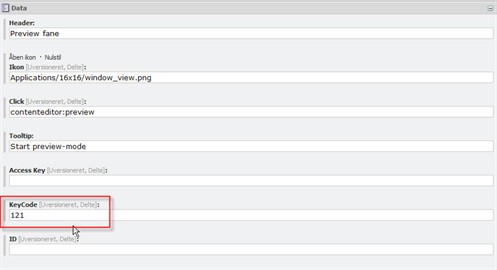
Now you should be able to start the preview by hitting F10.
Create new shortcuts in sitecore
A usefull little thing could be to create your own shortcuts keys in sitecore.
Of course one should be carefull not to override keys allready assigned.
In the file:
sitecore\shell\Controls\Applications\Global Keys.xml
<?xml version="1.0" encoding="utf-8" ?><br>
<control xmlns:def="Definition" xmlns="http://schemas.sitecore.net/Visual-Studio-Intellisense">
<GlobalKeys>
<RegisterKey KeyCode="120" Click="system:publish"/>
<KeyMap/>
</GlobalKeys>
</control>
Simple xml with registered shortcuts for the desktop, you can add your own.
So for example we want to add F10 as a shortcut for preview we add the line.
<RegisterKey KeyCode="121" Click="system:preview"/>
You can finde more keycodes here
Virtualuser in Sitecore 6
As promised a followup to virtualusers in sitecore.
This time for sitecore 6. The changes in the security model made to sitecore 6 makes only minor changes in the creation of the virtualusers. One of these changes are that the domain is set in the username.
using Sitecore.Data;
using Sitecore.Security.Authentication;
using Sitecore.Shell.Applications.ContentEditor.Gutters;

public class User {
private readonly Sitecore.Security.Accounts.User _userItem;

public User(string userName, bool isAdministrator)    {
//make sure that the username i prefixed with "sitecore"
//this sets the domain for the
userName = "sitecore\\"+userName
_userItem = AuthenticationManager.BuildVirtualUser(userName, true);
//Sitecore 6 needs profile settings for useritem
_userItem.Profile.Initialize(userName, true);
_userItem.Profile.Email = userName + "@something.dk";
_userItem.Profile.IsAdministrator = isAdministrator;
//save the useritem
_userItem.Profile.Save();
}

public bool Login()    {
bool loginResult = AuthenticationManager.Login(_userItem.Name);
//Used for setting the show locked item in the gutter
ID gID = new ID("{1A005ECC-65B4-4A00-88BE-A6FA7D64BEA3}");
//Id for showing all locked items
GutterManager.ToggleActiveRendererID(gID);
return loginResult;
}
}


 iStern Blog