Mocking Sitecore with Microsoft Fakes part 1
This post have been in making for a while or since the Visual Studio 2012 Update 2 was announced. Especially since the update added Microsoft Fakes to VS 2012 Premium. With Fakes it is now possible to mock Static methods and otherwise unmockable class’ for example DataTime.Now or a Sitecore Item. So now finally it is possible to do unit testing with Sitecore or if you like TDD. I know that this has been possible for a while if you used Glass Mapper og had access to a Typemock license.
This post is the first in a small series, on how to mock Sitecore out using Microsoft Fakes, and to begin with, I will have a look and extracting data from a Sitecore Item.
The two ways to get data from item i will cover here is either accessing a field through the field collection using item.Field[name of your field] or by the indexing found on the BaseItem which Item derives from like this item[name of your field].
The two code snippets below is used to run my test against one uses Field[] the other Item[]
public class CodeSnippet
{
   public static ID MY_TEXT_FIELD = new ID("{dc321650-5b1d-479a-ae81-c04d6585140d}");
   public static ID MY_CHECKBOX_FIELD = new ID("{a007c875-5192-4068-864d-523ffaa0b4ca}");
   public static string MISSING_TEXT = "MISSING TEXT";

   public string RunWithDataFromFieldCollection(Item item)
   {

      CheckboxField checkboxField = new CheckboxField(item.Fields[MY_CHECKBOX_FIELD]);
      if (checkboxField.Checked)
      {
        TextField textField = new TextField(item.Fields[MY_TEXT_FIELD]);
        string textValue = textField.Value;
        if (!string.IsNullOrEmpty(textValue))
          return textValue;
        return MISSING_TEXT;
      }
      return string.Empty;
  }

  public string RunWithDataFromBaseCustomItemIndex(Item item)
  {
    bool isChecked = item[MY_CHECKBOX_FIELD] == "1";
    if (isChecked)
    {
      string textValue = item[MY_TEXT_FIELD];
      if (!string.IsNullOrEmpty(textValue))
       return textValue;
      return MISSING_TEXT;
    }
    return string.Empty;
  }
}
First we look at the code that uses the Field[], This example is much like using the TestItem if used in earlier post found here, or at least the setup is. You need to setup a fieldcollection and ensure that the fields used exists in the collection.
 [TestClass]
 public class TestFieldAccess
 {
    private CodeSnippet _codeSnippet;

   [TestInitialize]
   public void Initialize()
   {
     _codeSnippet = new CodeSnippet();
   }

   [TestCleanup]
   public void CleanUp()
   {
     _codeSnippet = null;
   }

   [TestMethod]
   public void Run_WithCheckboxFieldNotChecked_ShouldReturnEmptyString()
   {
     using (ShimsContext.Create())
     {
       Field checkBoxField = new ShimField()
       {
         IDGet = () => CodeSnippet.MY_CHECKBOX_FIELD,
         ValueGet = () => "0"
       };
       FieldCollection fieldCollection = new ShimFieldCollection()
       {
         ItemGetID = id => checkBoxField
       };

       Item itemStub = new ShimItem() { FieldsGet = () => fieldCollection};
       string actualText = _codeSnippet.RunWithDataFromFieldCollection(itemStub);

       Assert.AreSame(string.Empty, actualText);
    }
  }

  [TestMethod]
  public void Run_WithCheckboxFieldCheckedButNotTextInTextField_ShouldReturnMissingText()
  {

   using (ShimsContext.Create())
   {
     Field checkBoxField = new ShimField()
     {
       IDGet = () => CodeSnippet.MY_CHECKBOX_FIELD,
       ValueGet = () => "1"
     };
     Field textField = new ShimField()
     {
      IDGet = () => CodeSnippet.MY_TEXT_FIELD,
      ValueGet = () =>string.Empty
     };
     FieldCollection fieldCollection = new ShimFieldCollection()
     {
      ItemGetID = id => id==CodeSnippet.MY_CHECKBOX_FIELD ?checkBoxField : id == CodeSnippet.MY_TEXT_FIELD ? textField : null
     };

     Item itemStub = new ShimItem() { FieldsGet = () => fieldCollection };
     string actualText = _codeSnippet.RunWithDataFromFieldCollection(itemStub);

     Assert.AreSame(CodeSnippet.MISSING_TEXT, actualText);
    }
   }

  [TestMethod]
  public void Run_WithCheckboxFieldCheckedButNotTextInTextField_ShouldReturnActualTextFromTextField()
  {
    using (ShimsContext.Create())
    {
     string expectedText = " Should return this string";
     Field checkBoxField = new ShimField()
     {
       IDGet = () => CodeSnippet.MY_CHECKBOX_FIELD,
       ValueGet = () => "1"
     };
     Field textField = new ShimField()
     {
       IDGet = () => CodeSnippet.MY_TEXT_FIELD,
       ValueGet = () => expectedText
     };
    FieldCollection fieldCollection = new ShimFieldCollection()
    {
      ItemGetID = id => id == CodeSnippet.MY_CHECKBOX_FIELD ? checkBoxField : id == CodeSnippet.MY_TEXT_FIELD ? textField : null
    };

    Item itemStub = new ShimItem() { FieldsGet = () => fieldCollection };

     string actualText = _codeSnippet.RunWithDataFromFieldCollection(itemStub);

     Assert.AreSame(expectedText, actualText);
    }
   }
 }
and the result off course 3 green bars with 100 % test coverage.
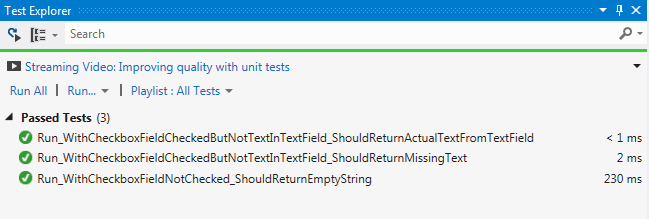
And yes there is a lot of setup.
Now lets look at the indexing, here it becomes a little tricky since the derived BaseItem public methods isn’t overwritten on a ShimItem there for we will have to fake calls to BaseItem instead of the Item but still we need to create a stub of the item with ShimItem.
 [TestClass]
 public class TestIndexAccess
 {
   private CodeSnippet _codeSnippet;

   [TestInitialize]
   public void Initialize()
   {
     _codeSnippet = new CodeSnippet();
   }

   [TestCleanup]
   public void CleanUp()
   {
    _codeSnippet = null;
   }

   [TestMethod]
   public void Run_WithCheckboxFieldNotChecked_ShouldReturnEmptyString()
   {
     using (ShimsContext.Create())
     {
      ShimBaseItem.AllInstances.ItemGetID = (item, id) => "0";
      Item itemStub = new ShimItem();
      string actualText = _codeSnippet.RunWithDataFromBaseCustomItemIndex(itemStub);
      Assert.AreSame(string.Empty, actualText);
     }
   }

  [TestMethod]
  public void Run_WithCheckboxFieldCheckedButNotTextInTextField_ShouldReturnMissingText()
  {
     using (ShimsContext.Create())
     {
      ShimBaseItem.AllInstances.ItemGetID = (item, id) => id == CodeSnippet.MY_CHECKBOX_FIELD ? "1" : id == CodeSnippet.MY_TEXT_FIELD ? string.Empty : null;
      Item itemStub = new ShimItem();

      string actualText = _codeSnippet.RunWithDataFromBaseCustomItemIndex(itemStub);

      Assert.AreSame(CodeSnippet.MISSING_TEXT, actualText);
    }
  }

  [TestMethod]
  public void Run_WithCheckboxFieldCheckedButNotTextInTextField_ShouldReturnActualTextFromTextField()
  {
    using (ShimsContext.Create())
    {
       string expectedText = " Should return this string";
       ShimBaseItem.AllInstances.ItemGetID =
        (item, id) => id == CodeSnippet.MY_CHECKBOX_FIELD ? "1" : id == CodeSnippet.MY_TEXT_FIELD ? expectedText : null;

      Item itemStub = new ShimItem();

      string actualText = _codeSnippet.RunWithDataFromBaseCustomItemIndex(itemStub);

      Assert.AreSame(expectedText, actualText);
   }
 }

}
<pre>
And once again the result off course 3 green bars with 100 % test coverage.

It might no be as smooth as Typemock mocking framework, and yes demands a bit more setup, at least at to begin with.
Sitecore MVC new Ninject Controller Factory – clean version
In this post we will have revisit my last blog post, using Ninject with Sitecore MVC. In this new approach we will simplify the code to do the exactly same thing as in the last post LINK.
So what we want is to be able to inject Concrete implementation in the our Sitecore Controller.
We will do this by creating a ninjectc controller factory and forwarding to the default Sitecore controller factory, so our implementation is used when Sitecore creates it’s controller. By doing it this way all standard Sitecore MVC functionality will still work, but we now have the possibility to inject our concrete implementation on creation time of the controllers.
First we need a Factory for creating the Ninject kernel
 public class NinjectKernelFactory
 {
   public IKernel Create()
   {
    return LoadAssembliesIntoKernel(new StandardKernel());
   }

   private IKernel LoadAssembliesIntoKernel(IKernel kernel)
   {
     foreach (Assembly assembly in AppDomain.CurrentDomain.GetAssemblies())
     {
      try
      {
        kernel.Load(assembly);
      }
      catch (Exception)
      {
         //Empty Catch used because ninject have problem
         //with loading some of the Sitecore MVC assemblies.
        // Method .ToString()
      }
    }
     return kernel;
   }
 }
With that in place we can create the the NinjectControllerFactory
 public class NinjectControllerFactory : DefaultControllerFactory
 {

  private IKernel _kernel;
  public NinjectControllerFactory(IKernel kernel)
  {
    _kernel = kernel;
  }

  public override void ReleaseController(IController controller)
  {
    _kernel.Release(controller);
  }

  protected override IController GetControllerInstance(RequestContext requestContext, Type controllerType)
  {
    return (IController)_kernel.Get(controllerType);
  }
 }
]
All that is left is now for binding it all together in a new InitilizeContollerFactory
 public class InitializeNinjectControllerFactory
 {
   public virtual void Process(PipelineArgs args)
   {
    SetControllerFactory(args);
   }

  protected virtual void SetControllerFactory(PipelineArgs args)
  {
    NinjectKernelFactory kernelFactory = new NinjectKernelFactory();
    NinjectControllerFactory ninjectControllerFactory = new NinjectControllerFactory(kernelFactory.Create());
    SitecoreControllerFactory sitecoreControllerFactory = new SitecoreControllerFactory(ninjectControllerFactory);
    ControllerBuilder.Current.SetControllerFactory(sitecoreControllerFactory);
  }
 }
And off course we need to swap the originale InitlizeControllerFactory with our new one.
Sitecore default :
</pre>
<processor type="Sitecore.Mvc.Pipelines.Loader.InitializeControllerFactory, Sitecore.Mvc"/>
Replaced with this:
<processor type="SitecoreNinjectModule.InitializeNinjectControllerFactory, SitecoreNinjectModule"/>
Now Lets try it our I have created a really simple example first an Item with a controller rendering on.

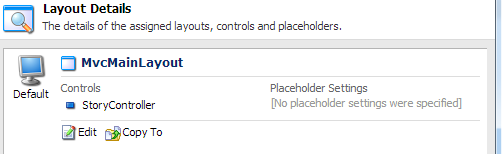
And the sourcode for the controller
public class StoryController : SitecoreController

{
 private ITestInterface _testInterface;
 public StoryController(ITestInterface testInterface)
 {
 _testInterface = testInterface;
 }

public ActionResult From()
 {

ViewBag.Froms = _testInterface.Get();
 return View();
 }
 }
And now to the View Code
And our RazerView
@model dynamic
 <h2>From vIew</h2>

@ViewBag.Froms
And a simple TestInterface and TestClass
public interface ITestInterface
 {
 string Get();
 }
public class TestClass : ITestInterface
 {
 public string Get()
 {
 return "Hallo From Test";
 }
 }
And the output of it all

There we are a much nicer and cleaner solution presented then I came up with in my last blog post and without breaking any Sitecore functionalit, and off course you can still unit test the controller.
Sitecore MVC Ninject controller
This is last post in the series of three. As promised in my last post we will inject a repository through the construct in the controller. To do this we will use the Ninject as our IOC container, This will be a very quick walkthrough.
Also we to make it a bit easier to find controller that needs to have class’ injected we will create a derived class from the controller class’,
    public class NinjectController : Controller
    {}
Some of the assmeblies in sitecore mvc solution gives and error when trying to reflect upon them so there are a couple of catch’s in the code to handle some minor bugs.
Next we will create our controller factory wrapping the Sitecores standard factory. This new Ninject controller factory will for the controller that should be loaded is of type nijectcontroller instantiate the corresponding concrete type of the constructers parameters.. Also this class loads all the ninject binding. Maybe it’s not so nice that it has multiple responsibility but it is left out for an exercise to refactor the code so it conforms to SRP 🙂 .
public class NinjectInitializeControllerFacotry
{
  public virtual void Process(PipelineArgs args)
  {
    this.SetControllerFactory(args);
  }

  protected virtual void SetControllerFactory(PipelineArgs args)
  {
    NinjectControllerFactory controllerFactory = new     NinjectControllerFactory(ControllerBuilder.Current.GetControllerFactory());
    ControllerBuilder.Current.SetControllerFactory(controllerFactory);
  }
}
and the controller factory it self
  public class NinjectControllerFactory : SitecoreControllerFactory
  {
    public NinjectControllerFactory(IControllerFactory innerFactory) : base(innerFactory)
    {
    }

    public override IController CreateController(RequestContext requestContext, string controllerName)
    {
      Assert.ArgumentNotNull(requestContext, "requestContext");
      Assert.ArgumentNotNull(controllerName, "controllerName");
      try
      {
         IController controller = ICreateController(requestContext, controllerName);
         return controller;
      }
      catch (Exception exception)
      {
        if (!MvcSettings.DetailedErrorOnMissingController)
        {
          throw;
        }
        return new ErrorHandlingController(controllerName, exception);
     }
   }

   public override void ReleaseController(IController controller)
   {
    var disposable = controller as IDisposable;

    if (disposable != null)
    {
      disposable.Dispose();
    }
  }

  private IController ICreateController(RequestContext requestContext, string controllerName)
  {
    string fullControllerName = string.Format("{0}Controller", controllerName);
    Type ninjectController = FindSpecificNinjectController(fullControllerName);
    if (ninjectController != null)
    {
      return (IController)Kernel.Get(ninjectController);
    }
    return base.CreateController(requestContext, controllerName);
  }

  private Type FindSpecificNinjectController(string controllerName)
  {
    IEnumerable<Type> ninjectControllers = GetNinjectControllers();
    if(ninjectControllers.Any())
    {
     Type selectedNincjectController = ninjectControllers.FirstOrDefault(controller => controller.Name == controllerName);
     if (selectedNincjectController != null)
     return selectedNincjectController;
   }
   return null;
  }

 private IEnumerable<Type> GetNinjectControllers()
 {
    List<Type> types = new List<Type>();
    foreach (Assembly assembly in AppDomain.CurrentDomain.GetAssemblies())
    types.AddRange(FindDerivedTypes(assembly, typeof(NinjectController)));
    return types;
 }
 private IEnumerable<Type> FindDerivedTypes(Assembly assembly, Type baseType)
 {
   try
   {
    return assembly.GetTypes().Where(t => baseType.IsAssignableFrom(t));
   }
   catch (Exception)
   {
    return new List<Type>();
 }
 }

  private static IKernel _kernel;
  private IKernel Kernel
  {
   get
   {
    if (_kernel == null)
      CreateKernel();
     return _kernel;
    }
 }

protected void CreateKernel()
 {
   _kernel = new StandardKernel();
    foreach (Assembly assembly in AppDomain.CurrentDomain.GetAssemblies())
   {
    if (HasNinjectModules(assembly))
    _kernel.Load(assembly);
  }
 }

public static bool HasNinjectModules(Assembly assembly)
 {
   Type baseType = typeof (NinjectModule);
   try
   {
    return assembly.GetTypes().Any(t => baseType.IsAssignableFrom(t));
   }
  catch (Exception)
  {
    return false;
  }
  }
}
So all that is left is to overwrite the standard controller factory.
<initialize>
 <processor type="SitecorePresentation.SitecoreMVCRoutes,SitecorePresentation">
 <mvcIgnoreHomePage>false</mvcIgnoreHomePage>
 </processor>
 <processor type="Sitecore.Mvc.Pipelines.Loader.InitializeGlobalFilters, Sitecore.Mvc"/>
 <processor type="SitecoreMVCNinjectExtension.NinjectInitializeControllerFacotry, SitecoreMVCNinjectExtension"/>
 <!--<processor type="Sitecore.Mvc.Pipelines.Loader.InitializeControllerFactory, Sitecore.Mvc"/>-->
 <processor type="Sitecore.Mvc.Pipelines.Loader.InitializeRoutes, Sitecore.Mvc"/>
 </initialize>
Next we can rewrite the controller from the last episode to conform to the new ninjectcontroller
public class NinjectItemController : NinjectController
 {
 private readonly IChildItemRepository _childItemRepository;
 public NinjectItemController(IChildItemRepository childItemRepository)
 {
 _childItemRepository = childItemRepository;
 }

public JsonResult Index(string id)
 {
 return Json(CreateObject(_childItemRepository.Get(id)), JsonRequestBehavior.AllowGet);
 }


private IEnumerable<object> CreateObject(IEnumerable<Item> items)
 {
 List<object> objectList = new List<object>();
 foreach (Item item in items)
 objectList.Add(new { item.Name });
 return objectList;
 }

}
The repositories from the last post looks the samen but are listed below.
</pre>
public interface IChildItemRepository
{
IEnumerable<Item> Get(string parentItemId);
}
<pre>
</pre>
public class ChildItemRepository : IChildItemRepository
{
public virtual IEnumerable<Item> Get(string parentItemId)
{
ID parentId;
if(ID.TryParse(parentItemId,out parentId))
return GetChildNodes(parentId);
return new List<Item>();
}

private IEnumerable<Item> GetChildNodes(ID parentId)
{
Item parentItem = Sitecore.Context.Database.GetItem(parentId);
return parentItem.GetChildren();
}
}
Now to ninject magic the ninject module that factory are loading bindings from.
public class ChildItemRepositoryNinjectModule : NinjectModule
{
public override void Load()
{
Bind<IChildItemRepository>().To<ChildItemRepository>();

}
}
And of course now we can rewrite out unittest to test the new controller.
public class ItemControllerTest
 {
 [Test]
 public void ItemControllWithNoIdShouldReturnEmptyList()
 {
 IChildItemRepository childItemRepositoryStub = Substitute.For<IChildItemRepository>();
 childItemRepositoryStub.Get(Arg.Any<string>()).Returns(new List<Item>());
 NinjectItemController controller = new NinjectItemController(childItemRepositoryStub);

 JsonResult result = controller.Index(string.Empty);
 Assert.That(result.Data,Is.Empty);
 }

[Test]
 public void ItemControllWithInvalideIDShouldReturnEmptyList()
 {

IChildItemRepository childItemRepositoryStub = Substitute.For<IChildItemRepository>();
 childItemRepositoryStub.Get(Arg.Any<string>()).Returns(new List<Item>());
 NinjectItemController controller = new NinjectItemController(childItemRepositoryStub);
 JsonResult result = controller.Index("invalidID");
 Assert.That(result.Data, Is.Empty);
 }

[Test]
 public void ItemControllWithValidIdShouldReturnJsonListWithItemNames()
 {
 IChildItemRepository childItemRepositoryStub = Substitute.For<IChildItemRepository>();
 List<Item> childList = new List<Item>();

 childList.Add(new ItemStub("stub-a"));
 childList.Add(new ItemStub("stub-b"));
 childList.Add(new ItemStub("stub-c"));
 childList.Add(new ItemStub("stub-d"));

Guid itemGuid = Guid.NewGuid();
 childItemRepositoryStub.Get(itemGuid.ToString()).Returns(childList);
 NinjectItemController controller = new NinjectItemController(childItemRepositoryStub);
 JsonResult result = controller.Index(itemGuid.ToString());

List<object>resultData = (List<object>) result.Data; ;
 Assert.AreEqual(4,resultData.Count());
 Assert.AreEqual(resultData[0].ToString(),"{ Name = stub-a }");
 Assert.AreEqual(resultData[1].ToString(), "{ Name = stub-b }");
 Assert.AreEqual(resultData[2].ToString(), "{ Name = stub-c }");
 Assert.AreEqual(resultData[3].ToString(), "{ Name = stub-d }");
 }
 }
The import thing about the rewrite of the test are the ugly SET on the itemctroller is removed as the repository is passed in as contructor argument.The result from the test

As a last service the image below shows the file structure in visual studio .

Thats all, now we can create easy to test controllers using a repository pattern.
Unit testing our MVC Controller for Sitecore
Is this post and as promised, we will unit test the controller we created in the last post.
So we will rewrite the controller a tiny little bit, so we can inject a child item repository, ie. creating a stub for the repository. Since Sitecore as default doesn’t ship with ControllerFactory where it is possible use dependency inject we will rewrite the controller instead, so it has a default repository it uses when Sitecore is instantiating the controller, and one it uses when testing, or more precisely you can pass one in to Repository property. The updated controller code is listed below. In my next post we will extend Sitecore so we can inject class through the contructor with dependency Inject using Ninject.
public class ItemController : Controller
{
private IChildItemRepository _childItemRepository;

public JsonResult Index(string id)
{
return Json(CreateObject(ChildItemRepository.Get(id)), JsonRequestBehavior.AllowGet);
}
public IChildItemRepository ChildItemRepository
{
get { return _childItemRepository ?? (_childItemRepository = new ChildItemRepository()); }
set { _childItemRepository = value; }
}

private IEnumerable<object> CreateObject(IEnumerable<Item> items)
{
List<object> objectList = new List<object>();
foreach (Item item in items)
objectList.Add(new { item.Name });
return objectList;
}

}
Now the three test cases
1. No id supplied the controller should return an empty result.
2. Supplied with an invalide Guid the controller should return an empty result.
3. Supplied with a valid guid, the controller should return a JSon result with the item names for all child items placed under the node with specified Guid,
Now for the Unit test class, as a mocking framework I’ve used NSubstitute. I’ve used the ItemStub I did in the this post Unit testing with Sitecore Item. The code for this test Item is also as a service listet below.
public class ItemStub : Item
{
public ItemStub(string itemName)
: base(ID.NewID, new ItemData(new ItemDefinition(ID.NewID, itemName, ID.NewID, ID.NewID),Sitecore.Globalization.Language.Invariant, new Sitecore.Data.Version(1), new FieldList()), new Database("dummy"))
{
}

}
[TestFixture]
 public class ItemControllerTest
 {
 [Test]
 public void ItemControllWithNoIdShouldReturnEmptyList()
 {
 IChildItemRepository childItemRepositoryStub = Substitute.For<IChildItemRepository>();
 childItemRepositoryStub.Get(Arg.Any<string>()).Returns(new List<Item>());
 ItemController controller = new ItemController();
 controller.ChildItemRepository = childItemRepositoryStub;
 JsonResult result = controller.Index(string.Empty);
 Assert.That(result.Data,Is.Empty);
 }

[Test]
 public void ItemControllWithInvalideIDShouldReturnEmptyList()
 {

IChildItemRepository childItemRepositoryStub = Substitute.For<IChildItemRepository>();
 childItemRepositoryStub.Get(Arg.Any<string>()).Returns(new List<Item>());
 ItemController controller = new ItemController();
 controller.ChildItemRepository = childItemRepositoryStub;
 JsonResult result = controller.Index("invalidID");
 Assert.That(result.Data, Is.Empty);
 }

[Test]
 public void ItemControllWithValidIdShouldReturnJsonListWithItemNames()
 {
 IChildItemRepository childItemRepositoryStub = Substitute.For<IChildItemRepository>();
 List<Item> childList = new List<Item>();

childList.Add(new ItemStub("stub-a"));
 childList.Add(new ItemStub("stub-b"));
 childList.Add(new ItemStub("stub-c"));
 childList.Add(new ItemStub("stub-d"));

Guid itemGuid = Guid.NewGuid();
 childItemRepositoryStub.Get(itemGuid.ToString()).Returns(childList);
 ItemController controller = new ItemController();
 controller.ChildItemRepository = childItemRepositoryStub;
 JsonResult result = controller.Index(itemGuid.ToString());

List<object>resultData = (List<object>) result.Data; ;
 Assert.AreEqual(4,resultData.Count());
 Assert.AreEqual(resultData[0].ToString(),"{ Name = stub-a }");
 Assert.AreEqual(resultData[1].ToString(), "{ Name = stub-b }");
 Assert.AreEqual(resultData[2].ToString(), "{ Name = stub-c }");
 Assert.AreEqual(resultData[3].ToString(), "{ Name = stub-d }");
 }
And a screenshot of the test status.

I know that there probably exists better ways to test json results, but it is out of scope for this post, and yes if it should be “clean tests” each test should only contain one assert, but is left for as an exercise for you :).
In the next post we will extend Sitecore so that we can create Controllers through dependency injection, with Ninject as an IoC container. With this solution we don’t need the ugly Set in the Repository Property.
Sitecore MVC the first controller.
Sitecore 6.6 is now out, (as a technical preview), with the realse of this version Sitecore now offers full support for MVC. There have all ready been quite a few blog post how to user MVC with Sitecore and some of the new fetures offers a great deal of ease when developing with Sitecore.
So this is the first in a series of how to develop with Sitecore using MVC and some of the benefits you get for free using MVC.
If you haven’t allready read John West blog post on how to setup you Sitecore solution to use MVC you can read them here start with Part 1 and use part 3 to setup a visual studio solution .John also wrote some simple examples on how to use the MVC framework to return JSON serialized result from a controller you read his original post here. For a first post in this Sitecore MVC series we will revisit his example and create our own controller but with a different approach, and with the soon to be released .Net 4.5 Framework which include the new web-api this should be even easier, and given you even more flexibility for free and out of the box, we will look back at this example when the final release is out.
By now you should now have an up an running Sitecore 6.6 solution. My visual studio solution setup is shown below.

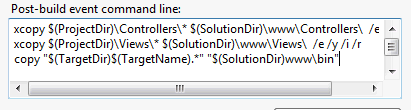
Now lets create our first controller Code listed below.
public class ItemController : Controller
 {

public JsonResult Index(string id)
 {
 return Json(CreateObject(ChildRepository.Get(parentItemId)), JsonRequestBehavior.AllowGet);
 }

private ChildItemRepository _childRepository;
 public virtual ChildItemRepository ChildRepository
 {
 get { return _childRepository ?? (_childRepository = new ChildItemRepository()); }

}

private IEnumerable<object> CreateObject(IEnumerable<Item> items)
 {
 foreach (Item item in items)
 yield return new {item.Name};
 }

}
With the controller in place you can change the route to newly created controller John in his example uses a Pipeline in Sitecore to achieve this i like this approache so much more the using the global.asax so we reuse his code for this with some minor alternations. The Id of the node we want to retrieve children for if not specified default to the id of the Home-node. I’ve done this because i don’t like all his assert for empty id, and if you don’t like you can just use the original approach with optional url parameter.You could if liked alsp default the index action. But instead of getting the id trough the url route data you should supply it as a argument to the action method. The key here is that parameter Id must be named the same as the input parameter in index method.
public class SitecoreMVCRoutes
 {

public virtual void Process(Sitecore.Pipelines.PipelineArgs args)
 {
 this.RegisterRoutes(RouteTable.Routes);
 }

public bool MvcIgnoreHomePage { get; set; }

protected virtual void RegisterRoutes(RouteCollection routes)
 {
 if (this.MvcIgnoreHomePage)
 {
 routes.IgnoreRoute(String.Empty);
 }

routes.MapRoute(
 "Default", // Route name
 "Item/{action}/{id}", // URL with parameters
 new { controller = "Item", action = "Index", id = "{110D559F-DEA5-42EA-9C1C-8A5DF7E70EF9}" } // Parameter defaults with Id to home node
 );
 }
 }
Now we will implement the busyness layer that will supply the controller with data.
This is done through a ChildRepository the code is listed below.
</pre>
public class ChildItemRepository
 {
 public virtual IEnumerable<Item> Get(string parentItemId)
 {
 ID parentId;
 if(ID.TryParse(parentItemId,out parentId))
 return GetChildNodes(parentId);
return new List<Item>();
 }

private IEnumerable<Item> GetChildNodes(ID parentId)
 {
 Item parentItem = Sitecore.Context.Database.GetItem(parentId);
 return parentItem.GetChildren();
 }
 }
<pre>
Lets test the new controller

First with out supplying a id,
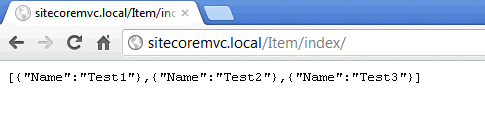
Now with a valid id different form the home-node.

And now with a invalid id.
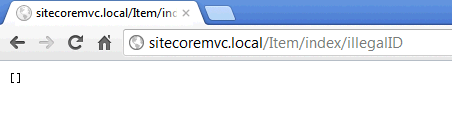
There we go the code does the same as Johns but with out all the assert tests.
Running Sitecore Field Editor from a command
When working with Sitecores page editor sometimes you need to edit Hidden fields for examples page metadata ie. “Page Title, Metakeywords, Metadescription”. You could probably use the editframe control and if in pageedit render out the metadatacontroll through a placeholder. But a more elegant way could be by adding a button in editor Ribbon see screenshot below, and executing the page editor with a limited set of fields, and is this post we would create a general command tha does exactly that.

To make the command as general as possible in would be tied to a settings item of the type
“/sitecore/templates/System/WebEdit/Field Editor Button”
Which contains fields for displaying
- Header
- Editor Icon
- List with fields that should be shown in the editor separated with “|”
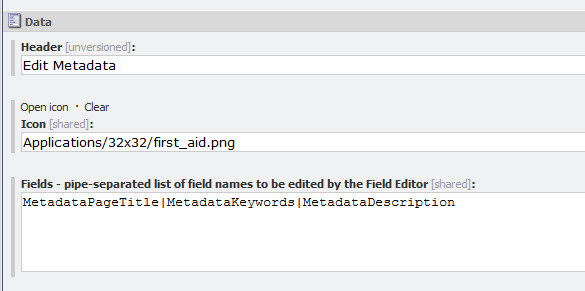
And even better you can use this where you are using the sc:editframe.
Now you can add a button of you liking, you could make a chunk here:
/sitecore/content/Applications/WebEdit/Ribbons/WebEdit/Page Editor/Metadata
Under the chunk add a button
/sitecore/content/Applications/WebEdit/Ribbons/WebEdit/Page Editor/Metadata/Edit

The click event
“command:executefieldeditor(path=/sitecore/content/Applications/WebEdit/Edit Frame Buttons/Metadata/EditMetadata)”
executes the command “command:executefieldeditor” specified in the commands.config file.
Mine looks like this
<command name="command:executefieldeditor" type="PT.Framework.ExecuteFieldEditorCommand.ExecuteFiledEditor,PT.Framework.ExecuteFieldEditorCommand"/>
Now to the code, by deriving from the “FieldEditorCommand” i get the execution of the page editor for free all i have to do is specifying the correct parameters in the virtual method “GetOptions” , note that the “PageEditFieldEditorOptions” is located in the Sitecore.Client.dll.
<
public class ExecuteFiledEditor : FieldEditorCommand
{
  protected override PageEditFieldEditorOptions GetOptions(ClientPipelineArgs args, NameValueCollection form)
  {
    EnsureContext(args);
    return new PageEditFieldEditorOptions(form, BuildListWithFieldsToShow()) { Title = SettingsItem[HEADER], Icon = SettingsItem[ICON] };
  }

  private void EnsureContext(ClientPipelineArgs args)
  {
    CurrentItem = Database.GetItem(ItemUri.Parse(args.Parameters[URIPARAMETER]));
    Assert.IsNotNull(CurrentItem, CURRENTITEMISNULL);
    SettingsItem = Client.CoreDatabase.GetItem(args.Parameters[PATHPARAMETER]);
    Assert.IsNotNull(SettingsItem, SETTINGSITEMISNULL);
  }
 private List<FieldDescriptor> BuildListWithFieldsToShow()
  {
    List<FieldDescriptor> fieldList = new List<FieldDescriptor>();
    ListString fieldString = new ListString(SettingsItem[FIELDNAME]);
    foreach (string field in new ListString(fieldString))
     if (CurrentItem.Fields[field] != null)
      fieldList.Add(new FieldDescriptor(CurrentItem, field));

   return fieldList;
  }

 private const string FIELDNAME = "Fields";
 private const string HEADER = "Header";
 private const string ICON = "Icon";

 private const string URIPARAMETER = "uri";
 private const string PATHPARAMETER = "path";
 private const string CURRENTITEMISNULL = "Current item is null";
 private const string SETTINGSITEMISNULL = "Settings item is null";

private Item CurrentItem { get; set; }
 private Item SettingsItem { get; set; }

}
And the final result:

Queries in Datasource location on Sitecore Layouts
The datasource location specified on layouts is limited to Sitecore paths.
But working with multisite solutions it is sometimes necessary to have some items stored locally under Site.
This could be done fairly easy hooking in to the Sitecore pipeline “getRenderingDatasource”, found in the web.config under
“/configuration/sitecore/pipelines/getRenderingDatasource”
Below I’ve inserted my own
“PT.Framework.Pipelines.GetDatasourceLocation,PT.Framework.Pipelines”
<getRenderingDatasource>
 <processor type="Sitecore.Pipelines.GetRenderingDatasource.GetDatasourceLocation, Sitecore.Kernel" />
 <processor type="PT.Framework.Pipelines.GetDatasourceLocation,PT.Framework.Pipelines" />
 <processor type="Sitecore.Pipelines.GetRenderingDatasource.SetFallbackDatasourceLocations, Sitecore.Kernel" />
 <processor type="Sitecore.Pipelines.GetRenderingDatasource.GetDatasourceTemplate, Sitecore.Kernel" />
 <processor type="Sitecore.Pipelines.GetRenderingDatasource.GetTemplatesForSelection, Sitecore.Kernel" />
 <processor type="Sitecore.Pipelines.GetRenderingDatasource.CheckDialogState, Sitecore.Kernel" />
 <processor type="Sitecore.Pipelines.GetRenderingDatasource.GetDialogUrl, Sitecore.Kernel" />
 </getRenderingDatasource>
The code for this step is really simple:
</pre>
public void Process(GetRenderingDatasourceArgs args)
 {
 Assert.IsNotNull(args, "args");
 DatasourceLocation = args.RenderingItem["Datasource Location"];
 if(QueryInDataSourceLocation())
 ProcessQuery(args);
 }

private void ProcessQuery(GetRenderingDatasourceArgs args)
 {
 ContextItemPath = args.ContextItemPath;
 ContentDataBase = args.ContentDatabase;
 Item datasourceLocation = ResolveDatasourceRootFromQuery();
 if (datasourceLocation != null)
 args.DatasourceRoots.Add(datasourceLocation);
 }

private bool QueryInDataSourceLocation()
 {
 return DatasourceLocation.StartsWith(_query);
 }

private Item ResolveDatasourceRootFromQuery()
 {
 string query = DatasourceLocation.Replace(_query, ContextItemPath);
 return ContentDataBase.SelectSingleItem(query);
 }

private string DatasourceLocation { get; set; }
 private string ContextItemPath { get; set; }
 private Database ContentDataBase { get; set; }
 private const string _query = "query:.";
<pre>
Now you can write queries like “./ancestor-or-self::*[@@templatekey=’site’]/Spots”
Update – Multiple datasource locations
Since one might want to have multiple Datasource Roots i made a change to the code so you can separate queries with the “|” delimiter. Note the normal sitecore path is still working and handled by the
“Sitecore.Pipelines.GetRenderingDatasource.GetDatasourceLocation”.
Now you can write
query:./ancestor-or-self::*[@@templatekey=’main section’]/QueryGlobal|/sitecore/content/GlobalSpots|query:./ancestor-or-self::*[@@templatekey=’site’]/Spots
public class GetDatasourceLocation
 {
 public void Process(GetRenderingDatasourceArgs args)
 {
 Assert.IsNotNull(args, "args");
 DatasourceLocation = args.RenderingItem["Datasource Location"];
 ContextItemPath = args.ContextItemPath;
 ContentDataBase = args.ContentDatabase;
 DatasourceRoots = args.DatasourceRoots;
 if(QueryInDataSourceLocation())
 ProcessQuerys(args);
 }

private void ProcessQuerys(GetRenderingDatasourceArgs args)
 {

ListString possibleQueries = new ListString(DatasourceLocation);
 foreach (string possibleQuery in possibleQueries)
 {
 if (possibleQuery.StartsWith(_query))
 ProcessQuery(possibleQuery);
 }

 }
 private bool QueryInDataSourceLocation()
 {
 return DatasourceLocation.Contains(_query);
 }

private void ProcessQuery(string query)
 {

 Item datasourceLocation = ResolveDatasourceRootFromQuery(query);
 if (datasourceLocation != null)
 DatasourceRoots.Add(datasourceLocation);
 }

private Item ResolveDatasourceRootFromQuery(string query)
 {
 string queryPath = query.Replace(_query, ContextItemPath);
 return ContentDataBase.SelectSingleItem(queryPath);
 }

private string DatasourceLocation { get; set; }
 private string ContextItemPath { get; set; }
 private Database ContentDataBase { get; set; }
 private List<Item> DatasourceRoots { get; set; }
 private const string _query = "query:.";

}
Unit testing Sitecore with Typemock Isolater.
In my last post I gave a stub example for a Sitecore Item. With the stub item you could test functionality for retrieving field data, which greatly limits the functionality you can test. So in this post I will have a look at the more advanced mocking framework Isolator from Typemock. With the Isolator framework it is possible to intercept calls for methods that normally wouldn’t be possible, for example static methods. How may this help us? Since Sitecore hasn’t made it any easier to do unit testing with a great deal of static classes and methods alike, you will be able to mock or stub them out with the Isolator framework. The following is a simple example for testing functionality for Item.Children, ie. Sitecores Childlist.
Here we have a simple piece of code that, given a specific Template ID, adds an item to a list and returns the list.
public class SectionFactory
{
   public static IEnumerable<Section> CreateCollection(Item columnItem)
   {
      ID sectionTemplateId = new ID(Constants.Templates.Section);
      ChildList children = columnItem.Children;
      List<Item> sections = new List<Section>();
      foreach (Item child in children)
      {
         if (child.TemplateID == sectionTemplateId)
            sections.Add(new Section(child))

      }

     return sections;
 }
}
Since getting the children for a Item invokes more than a few static methods and classes it is impossible to stub the functionality using most mocking frameworks. But with the Isolator Framework it is possible.
[TestFixture]
 public class SectionFactoryTest
 {
 [Test]
 public void SectionFactoryNoChildrenReturnEmpyList()
 {
 Item stub = Isolate.Fake.Instance<Item>();
 ChildList childlist = Isolate.Fake.Instance<ChildList>();
 Isolate.WhenCalled(() => stub.Children).WillReturn(childlist);
 IEnumerable<Section> sectionList = SectionFactory.CreateCollection(stub);
 Assert.AreEqual(new List<Section>(), sectionList);
 }

[Test]
 public void SectionFactoryOneChildReturnEmpyList()
 {
 Item stub = Isolate.Fake.Instance<Item>();
 Item child = Isolate.Fake.Instance<Item>();
 ChildList childlist = Isolate.Fake.Instance<ChildList>();

ID sectionTemplate = new ID(Constants.Templates.Section);
 Isolate.WhenCalled(() => child.TemplateID).WillReturn(sectionTemplate);
 Isolate.WhenCalled(() => childlist).WillReturnCollectionValuesOf(new List<Item>(){child});
 Isolate.WhenCalled(() => stub.Children).WillReturn(childlist);

ID link = new ID(Constants.Fields.Section.Links);
 Isolate.WhenCalled(() => LinkRepository.GetCollection(child, link)).WillReturn(null);

IEnumerable<Section> sectionList = SectionFactory.CreateCollection(stub);
 Section section = sectionList.FirstOrDefault();
 Assert.That(section, Is.Not.Null);

 }

[Test]
 public void SectionFactoryOneValidSectionChildChildReturnEmpyList()
 {
 Item stub = Isolate.Fake.Instance<Item>();
 Item sectionChild = Isolate.Fake.Instance<Item>();
 Item child = Isolate.Fake.Instance<Item>();
 ChildList childlist = Isolate.Fake.Instance<ChildList>();

ID sectionTemplate = new ID(Constants.Templates.Section);
 Isolate.WhenCalled(() => sectionChild.TemplateID).WillReturn(sectionTemplate);
 Isolate.WhenCalled(() => child.TemplateID).WillReturn(null);
 Isolate.WhenCalled(() => childlist).WillReturnCollectionValuesOf(new List<Item>() { child, sectionChild });
 Isolate.WhenCalled(() => stub.Children).WillReturn(childlist);

ID link = new ID(Constants.Fields.Section.Links);
 Isolate.WhenCalled(() => LinkRepository.GetCollection(child, link)).WillReturn(null);

IEnumerable<Section> sectionList = SectionFactory.CreateCollection(stub);

 Assert.AreEqual(1,sectionList.Count());

}
 }
So with the above test we managed to get a 100% test coverage for the code.
And with the Isolator Framework we could even mock out the Sitecore.Context. The Isolater framework is must a have if you want to do unit testing with Sitecore.
Unit testing with Sitecore Item
public class NavigationTitleFactory
 {
 public static string Create(Item item)
 {
 bool showInNavigation = item.GetCheckBoxField(new ID(Constants.Fields.Navigation.Show));

if (!showInNavigation)
 {
 return string.Empty;
 }

string navigationTitle = item.GetStringField(new ID(Constants.Fields.Navigation.Title));

 if (string.IsNullOrEmpty(navigationTitle))
 navigationTitle = item.Name;

 return navigationTitle;
 }
 }
public class TestItem : Item
 {
 public TestItem(FieldList fieldList,string itemName="dummy")
 : base(new ID(new Guid()), new ItemData(new ItemDefinition(new ID(new Guid()), itemName, new ID(new Guid()), new ID(new Guid())), Language.Invariant, new Sitecore.Data.Version(1), fieldList), new Database("web"))
 {

}
 }
- An Item with show in navigation not checked – it should return an empty string.
- An item with show in navigation checked but no navigation titel should return the Name of the Item.
- An item with show in navigation checked and with a navigation title, it should return the value of the navigation title.
The test code i listed below should give 100% test coverage of the code.
[TestFixture]
 public class NavigationTitleFactoryTest
 {
 [Test]
 public void CreateItemWithShowInMenuFalseShouldReturnEmptyString()
 {
 FieldList stubFieldList = new FieldList();
 stubFieldList.Add(new ID(Constants.Fields.Navigation.Show),"0");
 stubFieldList.Add(new ID(Constants.Fields.Navigation.Title),"NavigationTitle");
 Item stub = new TestItem(stubFieldList);

 string navigationTitle = NavigationTitleFactory.Create(stub);

 Assert.IsNullOrEmpty(navigationTitle);
 }

[Test]
 public void CreateItemWithShowInMenuTrueNoNavigationTitleShouldReturnItemName()
 {
 FieldList stubFieldList = new FieldList();
 stubFieldList.Add(new ID(Constants.Fields.Navigation.Show), "1");
 stubFieldList.Add(new ID(Constants.Fields.Navigation.Title), "");
 Item stub = new TestItem(stubFieldList,"myItemName");
 string navigationTitle = NavigationTitleFactory.Create(stub);

Assert.AreEqual("myItemName", navigationTitle);
 }

[Test]
 public void CreateItemWithShowInMenuTrueShouldReturnItemNavigationTitle()
 {
 FieldList stubFieldList = new FieldList();
 stubFieldList.Add(new ID(Constants.Fields.Navigation.Show), "1");
 stubFieldList.Add(new ID(Constants.Fields.Navigation.Title), "NavigationTitle");
 Item stub = new TestItem(stubFieldList);
 string navigationTitle = NavigationTitleFactory.Create(stub);

Assert.AreEqual("NavigationTitle",navigationTitle);
 }
 }
Allstair Deneys blog on unit testing with
Sitecore using a custom test runnner can be found here.How to change config files to work with Sitecore without a “context” here. By Mike Edwards
Dropbox integration with Sitecore
So consider this an Alpha-release, I’ve used this Dropbox Context we build in the last blog post “introduction to the dropbox api“. I’ve changend it a little bit so I can be used to make a static .aspx file where you can build the accestoken file. The changend Dropbox context is shown below
 public class DropboxContext
    {
        private OAuthToken _accessToken;

        private string _applicationKey;

        private string _applicationSecret;
        private string _accessTokenPath;

        private OAuthRestClient _apiRestClient;
        private OAuthRestClient _contentiRestClient;

        private string _version = "1.0";

        public DropboxContext(DropBoxSettings settings)
        {
            _applicationKey = settings.ApplicationKey;
            _applicationSecret = settings.ApplicationSecret;
            _accessTokenPath = settings.AccessTokenPath;
            SetupApiRestClient();
            SetupContentRestClient();
        }

        private void SetupApiRestClient()
        {
            _apiRestClient = new OAuthRestClient("https://api.dropbox.com");
            _apiRestClient.ConsumerKey = _applicationKey;
            _apiRestClient.ConsumerSecret = _applicationSecret;
            _apiRestClient.Version = _version;
        }

        private void SetupContentRestClient()
        {
            _contentiRestClient = new OAuthRestClient("https://api-content.dropbox.com");
            _contentiRestClient.ConsumerKey = _applicationKey;
            _contentiRestClient.ConsumerSecret = _applicationSecret;
            _contentiRestClient.Version = _version;
        }

        public OAuthToken GetRequestToken()
        {

            return new OAuthToken(_apiRestClient.GetRequestToken("1/oauth/request_token"));

        }

        public void AuthorizeToken(OAuthToken token)
        {
            Process.Start("https://www.dropbox.com/1/oauth/authorize?oauth_token=" + token.Token);
        }

        public void SetAccesToken()
        {
            OAuthToken accesToken = GetAccesTokenFromStore();
            if (accesToken == null)
            {
                OAuthToken requestToken = GetRequestToken();
                AuthorizeToken(requestToken);
              //  accesToken = UpgradeRequsetTokenToAccesToken(requestToken);
            }

            _accessToken = accesToken;
        }

        public void UpgradeRequsetTokenToAccesToken(OAuthToken requestToken)
        {
            if (requestToken == null)
                return;

            string tokenString = _apiRestClient.GetAccesToken("1/oauth/access_token", requestToken);
            OAuthToken token = new OAuthToken(tokenString);
            StoreAccessToken(tokenString);

        }

        public void StoreAccessToken(string tokenString)
        {
            FileStream fs = File.Open(_accessTokenPath, FileMode.OpenOrCreate, FileAccess.ReadWrite);
            StreamWriter sw = new StreamWriter(fs);
            sw.WriteLine(tokenString);
            sw.Close();
            fs.Close();

        }

        private OAuthToken GetAccesTokenFromStore()
        {
            OAuthToken token = null;
            string tokenString = TokenStringFromFile();
            if (!string.IsNullOrEmpty(tokenString))
                token = new OAuthToken(tokenString);

            return token;
        }

        private string TokenStringFromFile()
        {
            FileStream fs = File.Open(_accessTokenPath, FileMode.OpenOrCreate, FileAccess.ReadWrite);
            StreamReader sw = new StreamReader(fs);

            string tokenString = sw.ReadToEnd();
            sw.Close();
            fs.Close();
            return tokenString;
        }

        public AccountInfo AccountInfo()
        {
            var response = _apiRestClient.QueryServer<AccountInfo>("1/account/info", GetAccesTokenFromStore());
            return response;
        }

        public FileEntry GetMetadata(string path)
        {
            string requestPath = "1/metadata/dropbox";
            if (!String.IsNullOrEmpty(path))
                requestPath = String.Format("{0}{1}", requestPath, path.ToLower());
            var response = _apiRestClient.QueryServer<FileEntry>(requestPath, GetAccesTokenFromStore());
            return response;
        }

        public byte[] GetFile(string path)
        {
            var response = _contentiRestClient.GetStream("1/files/" + path, GetAccesTokenFromStore());
            return response;
        }
    }
Since this i an early release I’ve build this simple .aspx page that provides the user with a link to allow acces to their dropbox and writes the accesToken to a flat file, the file can we then copy to the sitecore data folder for later use.
<html xmlns="http://www.w3.org/1999/xhtml">
<head runat="server">
    <title></title>
</head>
<body>
    <form id="form1" runat="server">
    <div>

    Token : <%# Token.Token %> <br />
    Token Secret  <%# Token.TokenSecret %><br />

    <a href="https://www.dropbox.com/1/oauth/authorize?oauth_token=<%# Token.Token %>" target="_blank">Autherize Dropbox</a>

    <asp:Button ID="Button2" Text="Store Token" runat="server" onclick="Button2_Click" />
    </div>
    </form>
</body>
</html>
 public partial class AutherizeDropBox : System.Web.UI.Page
    {
        private OAuthToken token;
        private DropboxContext context;
        protected void Page_Load(object sender, EventArgs e)
        {
            context = new DropboxContext(SitecoreDropboxSettingsRepository.Get());

            if (!IsPostBack)
            {

                DataBind();
            }
        }

        protected void Page_PreRender(object sender, EventArgs e)
        {

        }

        protected  OAuthToken Token
        {
            get
            {
                if (ViewState["token"] != null)
                {
                    token = new OAuthToken();
                    token.Token = ViewState["token"].ToString();
                    token.TokenSecret = ViewState["tokenSecret"].ToString();
                }
                if (token == null)
                {
                    token = context.GetRequestToken();
                    ViewState["token"] = token.Token;
                    ViewState["tokenSecret"] = token.TokenSecret;
                }
                return token;
            }
        }

        protected void Button2_Click(object sender, EventArgs e)
        {

                OAuthToken t = Token;
                context.UpgradeRequsetTokenToAccesToken(t);

        }
    }
For dropbox context to work we need a valid dropboxcontext setting datacontainer. Information for this i stored as settings in the web.config
   <setting name="ApplicationKey" value="YOURAPPLIKATIONKEY" />
   <setting name="ApplicationSecret" value="YOURAPPLIKATIONSECRET" />
   <setting name="AccessTokenPath" value="PATHTOYOUFILETHATCONTAINSACCESSTOKEN" />
For this simple version of dropbox syncing I’ve build a simple sitecore task to run a “Download all service” from dropbox. It’s start by deleting all old the previously downloaded content from dropbox and the download from all content from dropbox root ie. “dropbox/”.
public class DropboxDownloadTask
    {
        CreateMediaItemService _createMediaItemService;
        public void Execute()
        {
            _createMediaItemService = new CreateMediaItemService();
            GetRoot();
        }

        private void GetRoot()
        {
            MetatadataRepository metatadataRepository = new MetatadataRepository();
            FileEntry root = metatadataRepository.Get();
            IterateOverChildren(root);
        }

        private void  IterateOverChildren(FileEntry folderEntry)
        {

            foreach (FileEntry entry in folderEntry.Contents)
            {
                if (entry.Is_Dir)
                  IterateOverChildren(GetFileEntry(entry));
                else
                  _createMediaItemService.CreateMediaItem(entry);
            }
        }

        private FileEntry GetFileEntry(FileEntry entry)
        {
            MetatadataRepository metatadataRepository = new MetatadataRepository();
            return metatadataRepository.Get(entry);
        }
    }
The task uses some file- and metadata-repositories that communicate with dropboxcontext and a simple settings repository.
 public static class SitecoreDropboxSettingsRepository
    {
        public static DropBoxSettings Get()
        {
            DropBoxSettings settings = new DropBoxSettings();
            settings.ApplicationKey = Settings.GetSetting("ApplicationKey");
            settings.ApplicationSecret = Settings.GetSetting("ApplicationSecret");
            string path = Settings.GetSetting("AccessTokenPath");
            settings.AccessTokenPath = HttpContext.Current.Server.MapPath(path);
            return settings;
        }

    }
public class MetatadataRepository
    {
        private DropboxContext _context;
        public MetatadataRepository()
        {

            _context = new DropboxContext(SitecoreDropboxSettingsRepository.Get());
        }

        public FileEntry Get()
        {
            return _context.GetMetadata(String.Empty);
        }

        public FileEntry Get(FileEntry entry)
        {
          return _context.GetMetadata(entry.Path);
        }
    }
 public class FileDataRepository
    {
        private  DropboxContext _context;
        public FileDataRepository()
        {

            _context = new DropboxContext(SitecoreDropboxSettingsRepository.Get());
        }

        public  byte[] Get(FileEntry entry)
        {
          return _context.GetFile(entry.Root+entry.Path);
        }
    }
Finally the task have a simple service that is responsible for adding a media stream to the sitecore media library.
 public class CreateMediaItemService
    {

        private MediaCreator _creator;
        private MediaCreatorOptions _mediaOptions;

        public void CreateMediaItem(FileEntry folderName)
        {
                 using (new SecurityDisabler())
                          AddStreamToMediaLibrary(folderName);

        }

        private void AddStreamToMediaLibrary(FileEntry folderName)
        {
             if(folderName.Parent == "dropbox")
                 SetMediaOptions(folderName.Parent, folderName.Name);
            else
                SetMediaOptions(String.Format("dropbox/{0}",folderName.Parent), folderName.Name);
            _creator = new MediaCreator();

            FileDataRepository fileDataRepository = new FileDataRepository();
            byte[] bytes = fileDataRepository.Get(folderName);

            MemoryStream theMemStream = new MemoryStream();

            theMemStream.Write(bytes, 0, bytes.Length);
            try
            {

                    _creator.CreateFromStream(theMemStream, folderName.Name, _mediaOptions);
            }
            catch (Exception e)
            {
                throw new Exception(folderName.Name, e);
            }
        }

        private void SetMediaOptions(string sitecorePath, string itemName)
        {
            _mediaOptions = new MediaCreatorOptions();
            _mediaOptions.FileBased = false;
            _mediaOptions.IncludeExtensionInItemName = false;
            _mediaOptions.KeepExisting = false;
            _mediaOptions.Versioned = false;
            _mediaOptions.Destination = String.Format("/sitecore/media library/{0}/{1}", sitecorePath, ItemUtil.ProposeValidItemName(itemName));
            _mediaOptions.Database = Database.GetDatabase("master");

        }

    }
Offcourse there are room for improvement and the code could use some cleaning up to is more “Clean Code” Uncle Bob. You can download the source code for this project at Pentia. I’m more then interrested in hearing what features should be on the todo-list so let me know.


 iStern Blog