Introduction to the dropbox api version 1.0
In this post i will explore some of the basic functionality of the new Dropbox Api, you can read more about here https://www.dropbox.com/developers/reference/api. As you can see in the description you talk to dropbox using rest, and OAuth as authentication method. I could of course buil my own OAuth helper instead i will use this OAuth base utility found at https://www.dropbox.com/developers/reference/api not that i that think it written as clean “clean code” I like it does the job, but i will give some trouble writting clean crisp method of some of the classes in this post. As a restclient I will use the client from http://restsharp.org/.
Some of the code in this post is also done very naive with no error handling so of course if you want to use the code one should deffently address this issue.
Before you start coding anything you first need to go to dropbox and create an app
https://www.dropbox.com/developers/apps
The app key and app secret should be replaced where necessary through out this post.
The authentication process at dropbox consist of three steps
- Get a request token
- Authorize the request token from step 1
- Upgrade the access token from step 1 to an Access token. The Access token should nt be stored and can be used in all future interaction with dropbox.
First a Token from dropbox i delivered from a rest response in form given below
oauth_token_secret=b9q1n5il4lcc&oauth_token=mh7an9dkrg59
So i made this simple yet NOT VERY CLEAN CODE CLASS
public class OAuthToken
    {
        public OAuthToken()
        {
        }

        public OAuthToken(string tokenString)
        {
            string[] urlParts = tokenString.Split('&');
            string[] secretParts = urlParts[0].Split('=');
            string[] tokenParts = urlParts[1].Split('=');
            TokenSecret = secretParts[1];
            Token = tokenParts[1];
        }

        public string TokenSecret { get; set; }
        public string Token { get; set; }
    }
Most of the other restquest a response with Json and the restsharp can deserialize them in datacontainers.
Now with token class in place we can create the firs rest call to supply us with at instance of a request token.
We first need some dropbox OAuth settings stored in this datacontainer
public class DropBoxSettings
    {
        public string ApplicationKey { get; set; }
        public string ApplicationSecret { get; set; }
        public string AccessTokenPath { get; set; }
    }
With this we can create a new OAuthrestClient
public class OAuthRestClient
    {
        private OAuthBase _oAuth;
        private RestClient _restClient;

        public OAuthRestClient(string restHost)
        {
            _oAuth = new OAuthBase();
            _restClient = new RestClient(restHost);
        }

        public string GetRequestToken(string resource)
        {
            RestRequest request = AddOAuthParameters(resource);
            RestResponse response = _restClient.Execute(request);
            return response.Content;
        }

        public string GetAccesToken(string resource,OAuthToken token)
        {
            RestRequest request = AddOAuthParameters(resource,token);
            RestResponse response = _restClient.Execute(request);
            return response.Content;
        }

        public T QueryServer<T>(string resource, OAuthToken token) where T : new()
        {
            RestRequest request = AddOAuthParameters(resource, token);
            RestResponse<T> restResponse = _restClient.Execute<T>(request);
            return restResponse.Data;
        }

        public byte[] GetStream(string resource, OAuthToken token)
        {
            RestRequest request = AddOAuthParameters(resource, token,false);
            RestResponse restResponse = _restClient.Execute(request);
            return restResponse.RawBytes;
        }

        private RestRequest AddOAuthParameters(string resource, OAuthToken token=null,bool encodeSignatur=true)
        {
            RestRequest request = new RestRequest(Method.GET);
            string nonce = _oAuth.GenerateNonce();
            string timeStamp = _oAuth.GenerateTimeStamp();
            request.Resource = resource;

            request.AddParameter("oauth_consumer_key", ConsumerKey);
            request.AddParameter("oauth_nonce", nonce);
            request.AddParameter("oauth_signature_method", "HMAC-SHA1");
            request.AddParameter("oauth_timestamp", timeStamp);
            if(token != null)
                request.AddParameter("oauth_token", token.Token);
            request.AddParameter("oauth_version", "1.0");
            request.AddParameter("oauth_signature", BuildSignatureWithToken(resource, nonce, timeStamp, token, encodeSignatur));
            return request;
        }

        private string BuildSignatureWithToken(string resource, string nonce, string timeStamp, OAuthToken token,bool encodeSignature)
        {
            string normalizedUrl;
            string normalizedRequestParameters;
            string sig;
            if(token == null)
             sig = _oAuth.GenerateSignature(new Uri(string.Format("{0}/{1}", _restClient.BaseUrl, resource)), ConsumerKey, ConsumerSecret, "", "", "GET", timeStamp, nonce, out normalizedUrl, out normalizedRequestParameters);
            else
             sig = _oAuth.GenerateSignature(new Uri(string.Format("{0}/{1}", _restClient.BaseUrl,resource)),ConsumerKey, ConsumerSecret,token.Token, token.TokenSecret,"GET", timeStamp, nonce, out normalizedUrl, out normalizedRequestParameters);

            if(encodeSignature)
                sig = HttpUtility.UrlEncode(sig);
            return sig;
        }

        public string Version { get; set; }
        public string ConsumerKey { get; set; }
        public string ConsumerSecret { get; set; }
    }
There are som input parameters that are bool which i due some restriction bugs in the OAuth base where a token not should be added in the requesttoken call. And the dropbox api where the signature shouldn’t be urlencode when querying api-content.dropbox.com. We can now use this to get a request token.
  public OAuthToken GetRequestToken()
        {
            OAuthRestClient apiRestClient = new OAuthRestClient("https://api.dropbox.com");
            apiRestClient.ConsumerKey = YOUR APP KEY;
            apiRestClient.ConsumerSecret = YOUR APP SECRET;
            apiRestClient.Version = "1.0";
            return new OAuthToken(_apiRestClient.GetRequestToken("1/oauth/request_token"));
        }
Now with request token we can prompt the user for access to his or hers dropbox account this can for now only be done in a browser
private void AuthorizeToken(OAuthToken token)
        {
            Process.Start("https://www.dropbox.com/1/oauth/authorize?oauth_token=" + token.Token);
        }
Now with application authorized we ca upgrade the requesttoken to an accestoken, and store it in a secure place for now we store it as a string in a plaintext file.
 private OAuthToken UpgradeRequsetTokenToAccesToken(OAuthToken requestToken)
        {
 OAuthRestClient apiRestClient = new OAuthRestClient("https://api.dropbox.com");
            apiRestClient.ConsumerKey = YOUR APP KEY;
            apiRestClient.ConsumerSecret = YOUR APP SECRET;
            apiRestClient.Version = "1.0";
            string tokenString = apiRestClient.GetAccesToken("1/oauth/access_token", requestToken);
            OAuthToken token = new OAuthToken(tokenString);
            StoreAccessToken(tokenString);
            return token;
        }

        private void StoreAccessToken(string tokenString)
        {
            FileStream fs = File.Open(_accessTokenPath, FileMode.OpenOrCreate, FileAccess.ReadWrite);
            StreamWriter sw = new StreamWriter(fs);
            sw.WriteLine(tokenString );
            sw.Close();
            fs.Close();

        }

        private OAuthToken GetAccesTokenFromStore()
        {
            OAuthToken token = null;
            string tokenString = TokenStringFromFile();
            if(!string.IsNullOrEmpty(tokenString))
             token = new OAuthToken(tokenString);

            return token;
        }

        private string TokenStringFromFile()
        {
            FileStream fs = File.Open(_accessTokenPath, FileMode.OpenOrCreate, FileAccess.ReadWrite);
            StreamReader sw = new StreamReader(fs);

            string tokenString =  sw.ReadToEnd();
            sw.Close();
            fs.Close();
            return tokenString;
        }
Now with an accestoken we can start talking to dropbox to the more fun stuff for example the userinformation
public class AccountInfo
    {
        public string Uid { get; set; }
        public string Display_Name { get; set; }
        public string Country { get; set; }
        public QuotaInfo Quota_Info { get; set; }
    }
 public class QuotaInfo
    {
        public string Shared { get; set; }
        public string Quota { get; set; }
        public string Normal { get; set; }
    }
or metadata for a a given path in the users dropbox
 public class FileEntry
    {
        public string Size { get; set; }
        public string Rev { get; set; }
        public string Thumb_Exists { get; set; }
        public string Bytes { get; set; }
        public string Modified { get; set; }
        public string Path { get; set; }
        public bool Is_Dir { get; set; }
        public string Icon { get; set; }
        public string Root { get; set; }
        public string Mime_Type { get; set; }

        public string Revision { get; set; }
        public List<FileEntry> Contents { get; set; }

        public string Name
        {
            get
            {

                if (String.IsNullOrEmpty(Path)) return String.Empty;
                if (Path == "/") return "dropbox";
                    return Path.Substring(Path.LastIndexOf("/") + 1);
            }
        }

        public string Parent
        {
            get
            {
                if (String.IsNullOrEmpty(Path)) return String.Empty;
                if (Path.LastIndexOf("/") == 0) return "dropbox";
                return Path.Substring(0,Path.LastIndexOf("/"));

            }
        }

    }
public AccountInfo AccountInfo()
{
OAuthRestClient apiRestClient = new OAuthRestClient("https://api.dropbox.com");
apiRestClient.ConsumerKey = YOUR APP KEY;
apiRestClient.ConsumerSecret = YOUR APP SECRET;
apiRestClient.Version = "1.0";
var response = apiRestClient.QueryServer<AccountInfo>("1/account/info", YOUR ACCES TOKEN);
return response;
}</pre>
<pre>
Now we could can the byte[] for a dropbox entry if it is not a folder, note when calling the api-content.dropbox.com the SIGNATURE PASSED TO DROPBOX SHOULD NOT BE URL -ENCRYPTED why i have no clue
public byte[] GetFile(string path)
        {
          OAuthRestClient apiRestClient = new OAuthRestClient("https://api-content.dropbox.com");
            apiRestClient.ConsumerKey = YOUR APP KEY;
            apiRestClient.ConsumerSecret = YOUR APP SECRET;
            apiRestClient.Version = "1.0";
            var response = apiRestclient.GetStream("1/files/dropbox/" + HttpUtility.UrlEncode(path), YOURRACCESTOKEN);
            return response;
        }
I’ve gathered all the functions in a simple Dropbox context.
So this wraps it up for now. in future post I will look into uploading files, but in the next post I will integrate this into the sitecore media library, for now only with download only and always overwrite. Coming soon so stay tuned.
Running Scheduledtasks with the jobmanager in Sitecore
I’ve recently had the need to execute a scheduled task. The simple way would be to fetch the scheduled task item from Sitecore an instantiate it as a ScheduledItem type found in Sitecore kernel namespace, and the Call the execute method found in the class.
Item item = database.GetItem(taskId);
 ScheduleItem scheduleItem = new ScheduleItem(item);
 scheduleItem.Execute();
This of course Will run the task in the context of the current user. This could lead to some minor issues where the user running task doesn’t have the same rights as the Sitecore build JobManager.The solution is to execute the task via the JobManager, which also is used by scheduler. This is done by providing simple JobOptions. The example belows instantiate a new MyTask and runs the execute method.
 JobOptions options = new JobOptions("Job Runner", "schedule", "scheduler", new MyTask(), "Execute", new object[] { scheduleItem.Items,  scheduleItem.CommandItem, scheduleItem });
 options.SiteName = "scheduler";
 JobManager.Start(options).WaitHandle.WaitOne();
The last parameter passed in as a new object is the parameter list passed on to the Execute Method.
Loosely couple ninject kernel in MVC applications
I’m currently working on a hobby project “a photosite”, where I’m using MVC 3 with Entity Framwork 4 and Ninject IOC container. Maybe I overdid the decoupling of the Ninject kernel for this project, but I was fun to do and I gave material for this post :). The goal was to build a MVC project where the repository implementation was placed in separate project together with ninject binding.
So here is the repository Interaface:
public interface IGalleryRepository
{
   IEnumerable<Gallery> All { get; }
}
And here is the concrete implementation for the interface
public class GalleryRepository : IGalleryRepository
{
   PhotoSiteContext context = new PhotoSiteContext();
   public IEnumerable<Gallery> All
   {
    get { return context.Galleries; }
   }
}
Now we need to alter the global.asax file with the following.
public class MvcApplication : NinjectHttpApplication
{
   public static void RegisterGlobalFilters(GlobalFilterCollection filters)
   {
     filters.Add(new HandleErrorAttribute());
}
public static void RegisterRoutes(RouteCollection routes)
{
routes.IgnoreRoute("{resource}.axd/{*pathInfo}");
routes.MapRoute(
"Default", // Route name
"{controller}/{action}/{id}", // URL with parameters
new { controller = "Gallery", action = "Index", id = UrlParameter.Optional } // Parameter defaults
);
}
protected override void OnApplicationStarted()
{
base.OnApplicationStarted();

AreaRegistration.RegisterAllAreas();
RegisterGlobalFilters(GlobalFilters.Filters);
RegisterRoutes(RouteTable.Routes);
}
protected override IKernel CreateKernel()
      {
var kernel = new StandardKernel();
kernel.Load(AppDomain.CurrentDomain.GetAssemblies());
return kernel;
}
}
By loading the kernel this way Ninject will looke through all dll’s in the bin folder of MVC project “main project” and load all assemblies which inherit from the NinjectModul class.
Now we cant in same project as the implementation of the inteface make a new class which derives from Ninject modul. The class should look like this.
public class SqlCompactNinjectModule : NinjectModule
{
public override void Load()
{
Bind<IGalleryRepository>().To<GalleryRepository>();
}
}
Simple json deserialization in C#
In This post a brieflyguid to how to deserialize Json encoded strings. Json is string that can be used t describe complex datastruces fx. C# class’.
A simple Json string could look something like this.
{"TokenId":"tokenid", "TokenSecret":"secretcode"}
This corresponding C# class would look something like this
public class Token
{
public string TokenId { get; set; }
public string TokenSecret { get; set; }
}
Now given the exaample Json string above we can deserialize using .Net stand javascript deserialze, like this. The Javascriptserializer is placed in System.web.Serializationn.
   JavaScriptSerializer javaScriptSerializer = new JavaScriptSerializer();
Token deserializedToken = javaScriptSerializer.Deserialize<Token>("{\"TokenId\":\"tokenid\", \"TokenSecret\":\"secretcode\"}");
The "deserializedToken" object have now been intialized and both properties "TokenId" and "TokenSecret" has been set to the value folloing the ":" int json string. you can also have more complex structure represented by using in the Json string "[]" you will then have etend your class to contain a list as the example below
public class Token
{
public string TokenId { get; set; }
public string TokenSecret { get; set; }
public IEnumerable<Token> ChildTokens { get; set; }
}
So given the Json string
"{\"TokenId\":\"tokenid\", \"TokenSecret\":\"secretcode\" ,\"ChildTokens\" : [{\"TokenId\":\"tokenid\", \"TokenSecret\":\"secretcode\"}]}"
Your deserialized token object will contain a list with one ChildToken.
Serialization is left for another post.
I will use this Json deserialization in a feature blogpost to communicate with a OAuth server.
Bubble Sort algorithm developed with TDD. Code Kata.
After I’ve been on a three day course with Uncle Bob in Copehangen, I got inspired by the code kata concept. And now want to do Kata from time to time to train coding.
I’ve wanted to start with something simple so I chose to do a sort algorithm. I was trying to make a video out of it, but got stuck with quicktime. Hoping to get it to work in the future. So for now you will have to settle with the testcases and code. I’m trying to use the guidelines from Clean Code so no comments will be in the code, functions and variable names should reveal their purpose. How the code works should be visible from the Testcases.
Test cases.
package Sort;

import junit.framework.Assert;
import org.junit.Test;

import java.util.Arrays;

public class SorterTest {
  @Test
  public void SortEmptyList_ShouldReturnEmptyList() {
    Assert.assertTrue(Arrays.equals(new int[]{},
                        Sorter.Sort(new int[]{})));
 }

 @Test
 public void SortListWithOneElement_ShouldReturnSortedList() {
   Assert.assertTrue(Arrays.equals(new int[]{1},
                       Sorter.Sort(new int[]{1})));
 }

 @Test
 public void SortListWithTwoElementsInCorrectOrder_ShouldReturnSameList() {
   Assert.assertTrue(Arrays.equals(new int[]{1, 2},
                       Sorter.Sort(new int[]{1, 2})));
 }

 @Test
 public void SortListWithTwoElementsInReverseOrder_ShouldReturnSortedList() {
   Assert.assertTrue(Arrays.equals(new int[]{1, 2},
                       Sorter.Sort(new int[]{2, 1})));
 }

 @Test
 public void SortListWithSameTwoElementsr_ShouldReturnSortedList() {
   Assert.assertTrue(Arrays.equals(new int[]{2, 2},
                       Sorter.Sort(new int[]{2, 2})));
 }

 @Test
 public void SortListWithThreeElementsInCorrectOrder_ShouldReturnSortedList() {
   Assert.assertTrue(Arrays.equals(new int[]{1, 2, 3},
                       Sorter.Sort(new int[]{1, 2, 3})));
 }

 @Test
 public void SortListWithThreeElementsFirstTwoSwapped_ShouldReturnSortedList() {
   Assert.assertTrue(Arrays.equals(new int[]{1, 2, 3},
                       Sorter.Sort(new int[]{2, 1, 3})));
 }

 @Test
 public void SortListWithThreeElementslastTwoSwapped_ShouldReturnSortedList() {
   Assert.assertTrue(Arrays.equals(new int[]{1, 2, 3},
                       Sorter.Sort(new int[]{1, 3, 2})));
 }

 @Test
 public void SortListWithThreeElementslReverseOrder_ShouldReturnSortedList() {
   Assert.assertTrue(Arrays.equals(new int[]{1, 2, 3},
                       Sorter.Sort(new int[]{3, 2, 1})));
 }

 @Test
 public void SortListWithNElementaRandomOrder_ShouldReturnSortedList() {
   Assert.assertTrue(Arrays.equals(new int[]{1, 2, 3, 4, 5, 6, 6, 7, 8},
                       Sorter.Sort(new int[]{3, 2, 7, 6, 4, 8, 6, 1, 5})));
 }
}
And now to the refactored code.
package Sort;

public class Sorter {
  public static int[] Sort(int[] unSortedList) {
    if (unSortedList.length > 1)
      SortList(unSortedList);
    return unSortedList;
 }

 private static void SortList(int[] unSortedList) {
   int unsortedLength = unSortedList.length;
   while (unsortedLength > 0) {
     PlacedLargestElementAtEndOfList(unSortedList);
     unsortedLength--;
   }
 }

 private static void PlacedLargestElementAtEndOfList(int[] unSortedList) {
   for (int j = 0; j < i.length - 1; j++)
     SortElements(unSortedList, j);
 }

 private static void SortElements(int[] unSortedList, int j) {
   if (unSortedList[j] > unSortedList[j + 1])
     SwapElements(unSortedList, j);
 }

 private static void SwapElements(int[] unSortedList, int j) {
   int backupelement = unSortedList[j];
   unSortedList[j] = unSortedList[j + 1];
   unSortedList[j + 1] = backupelement;
 }
}
CMS Friendly URL With MVC (Simple)
I currently working on HUGE MVC project for a customer through Pentia. They are rebuilding their entire website from .Net webforms to MVC 3 with Razer.
So one of the first task was to build som simpel functionality tha could resolve their url delivered from the underlying CMS.Instead of register specific routes for the different pagetypes in the CMS
I came up with this solution shown in this blogpost.
To begin with I registered a new “CMS route in global.asax”. All URL shoul hit this route, ofcourse you could make other routes before this.
//RouteMap for CMS content
routes.MapRoute("CMSRoute", "{*url*}").RouteHandler = new CmsRouteHandler();
Now to the simple CmsRouteHandler implementation it simply calls the CmsHttpHandler a relying on the handler to find a correct controller to desplaying the current request.
public class CmsRouteHandler : IRouteHandler
{
public IHttpHandler GetHttpHandler(RequestContext requestContext)
{
return new CmsHttpHandler(requestContext);
}
}
Now the CMSHttpHandle which for this blogpost is simplyfied to always returning the
frontpage. This should offcourse by matching the url to a page i DB and displaying the
and resolve it to the correct controller.
public class CmsHttpHandler : IHttpHandler
{
private RequestContext RequestContext { get; set; }
private IControllerFactory ControllerFactory { get; set; }
private IController Controller { get; set; }

public CmsHttpHandler(RequestContext requestContext)
{
RequestContext = requestContext;
}

public void ProcessRequest(HttpContext context)
{
HttpContext = context;
InstantiateControllerFactory();
InstantiateController();
SetupRequestContext();
Controller.Execute(RequestContext);
}

private HttpContext HttpContext { get; set; }

private void InstantiateControllerFactory()
{
ControllerFactory = ControllerBuilder.Current.GetControllerFactory();
}

private void InstantiateController()
{
Controller = ControllerFactory.CreateController(RequestContext, Pagetype);
}

private void SetupRequestContext()
{
RequestContext.RouteData.Values.Add("controller", Pagetype);
//Always render Index action, all pagetype controllers must implement Index action
RequestContext.RouteData.Values.Add("action", "Index");

AppendQueryStrings();
}

private void AppendQueryStrings()
{
foreach (string name in HttpContext.Request.QueryString)
RequestContext.RouteData.Values.Add(name, HttpContext.Request.QueryString[name]);
}

private static string ResolvePagetypeFromUrl()
{


//Should return apgetype from db/URL
return Pagetype


}

private string _pageType;
private string Pagetype
{
get
{
//Resolve pagetype from DB fx
//For now we will just return the frontpage
/return string should match controller name
return "frontpage";
}
}

public bool IsReusable
{
get
{
throw new NotImplementedException();
}
}
}
Hope you find it usefull..
Interface Templates
For this post I will look into a simple technique for building easy to extend or reuse features in Sitecore solutions. This simple architectural concept will, for the rest of this blog post, be refereed to as an Interface template. This idea comes from my work in Pentia, where we build website that should be easy to maintain and reuse or extend implemented features. Some of you, that where at Dreamcore 2010, might have been so lucky, that they saw my brilliant colleague Thomas Eldblom in cooperation with Dan Algrove from Hedgehog development, in a session on how to build maintainable Sitecore solutions. You can read more great thoughts from Thomas at his blog Molten Core. Some of the key points from this session and my daily work with Thomas is the base for the blog post, and I will not take any credit for being the inventor for the interface template concept. I’ve just used it a lot recently to make it easier for new templates/pagetypes to reuse implemented code features, and thought I would make for a good post.
We all know that code degrades as time goes by, and that the more “quick fixes – Hey it works don’t change it” where used during implementation the faster the code degrades, and oh yes even the best code will degrade over time, but maybe not on a quite as steep slope.
We have all tried to write simple parts of a website, but even the simple parts may lead to complicated code. Let’s take an simple example as a Menu or Breadcrumb path. Most websites have some sorts of navigation and likewise have breadcrumbs. So to start with the Customer have a simple website where the breadcrumb starts at the current item and works it’s way up the content tree to the root of the site i.e. at the front page. It would be an fairly easy task to implement code that can build this sort of breadcrumb path. This could be done either in an simple xslt or maybe by implementing some sort of breadcrumb provider in c# class.We will traverse every ancestor until the following condition is meet. This could for example be done using a Sitecore query a look something like this.
Note only pseudo code will be used in this post.
ancestor-or-self::item[@tid = ‘frontpage’]
This will work great and is a simple and acceptable solution. So what is the problem ? After an year your customer returns with an wish that they want functionality restart the navigation “breadcrumb” for some node in content tree, this could be anywhere. So the root item ie the first link in the breadcrumbs path is no longer the front page but could potentially be any node.
The question now is, how do you determine where the root of the breadcrumbs path is? You can no longer settle for a simple test against the “frontpage”-template or could we ? A simple way would either be to make an new front page at the given point in the content tree, but it seems stupid that the customer will have to use a front page for this task and might be confusing as well. So okay no problem we will just make an new template, or choose a page type and add the template to the query condition and it might look something like this.
ancestor-or-self;;item[@tid = ‘frontpage’ or @tid = ‘subfrontpage’]
Great it works and was pretty simple too, but now we started on the slippery slope.The key point to notice here is that for this to work we had to make changes to the code.
What will happen the next time the customer returns with a wish to reset the navigation for the all ready existing document template or any template for that matter. And even more the document template should have a check box that enables the reset features. No problem we simply add the check box to the document template and extend the select query.
ancestor-or-self::item[@tid = ‘frontpage’ or @tid = ‘subfrontpage’ or (@tid = ‘document’ and resetmenuField = ‘1’ )]
Wow it worked but now the query is becoming quite complex and keep in mind this is an simple example. And soon the customer will be back with a note that the shoppingItemTemplate needs to reset the breadcrumbs as well and with the same condition as the document template. As the years go bye the query is becoming more and more unreadable.
But how can we avoid this slippery slope ?
We could build a new template and let it inherit from the “frontpage”-template, new template will then have the same fields as the front page. This might lead to a more confused customer because a simple document template will have the same field as front page without using them.
So now we will have a look at an interface template. This could be a simple template with or without fields. The sole purpose of the this interface template, is to define “some functionality”
for another templates that inherits from it. Lets revisit our example with the breadcrumbs.
First we define this template without any fields lets call it _isMenuRoot. And let the frontpage template inherit from this. Now we can write the first query as this.
ancestor-or-self::item[ is derived from template _isMenuRoot]
The query will return the front page as the menu root just as we wanted. Perfect now the beauty of the simple template comes into play. Now the customer wants a simple sub front page that can reset the breadcrumbs. This should be a fairly easy task. Build your normal sub front page a let it inherit from the _isMenuRoot template now look at the query
ancestor-or-self::item[ is derived from template _isMenuRoot]
Wow it’s the same and we didn’t have to change anything in the code, great!
Now let’s extend the template so it has a simple checkbox field that allows back end users to enable/disable the reset functionality. This is done simply by extending the _isMenuRoot Template with an checkbox field. Of course this demands for a simple change to the code, so we change the query accordingly so it reads.
item[ is derived from template _menuRoot and reset menu = 1]
Of course this will force back end users to actively enable/disable this feature for existing items. But this can be done fairly easy on templates that inherit from the interface template. For example, you might want the front page to always have this feature enabled, and as default disabled for a document page or alike. You can achieve this but setting the checkbox value in standard values for all the templates the inherits from our _isMenuRoot interface template. Thank you sitecore for standard values. So without changing any code, future templates can nowgain access to this Menu root functionality by inheriting from our _isMenuRoot template.
The above helped me on project i recently worked on where I had an if statements that had to test for 8 different templates. Everytime someone came to develop new templates/page types they had to go in and actively add another clause to the if statement, if they wanted to acces the code features provided after in if statement. This were change by the use of an interface template so the if statement checked for an interface template instead of 8 different templates .And of course all the template previously in the if statement, now simply had to inherit from the newly created interface template. New templates/pages, that want to reuse the same functionality, simply had to inherit from the interface template,without the need for changing any code at all.
Google Chart Tools
No i haven’t forgotten about my blog, and yes it’s been a while since my last post. So i’m sorry for not answering questions quickly.
So in this post I will have a look at the chart tools google provides, you can read more about here http://code.google.com/apis/chart/ .
In Pentia we have a different tools for monitoring different parameters and i thought i could be fun to have some graphical reprensentation of this, and luckely one of colleagues told me about the chart tools at google. So in this post we have a quick look at this service from google. I will only do the simple piechart but it is possible to build more complex chart.
So since I want different input to the chart tools I will first build a simple interface, and do and simple demo implementation.
interface IChartItem
{
string Label { get; }
string Size { get; }
}
and now to the simple implementation
public class Demo : IChartItem
{
public Demo(string label,string size)
{
Label = label;
Size = size;
}<br>

public string Label
{<br>
get; private set;
}

public string Size
{
get;
private set;
}
}
Now to the glue that combines or more build the url for image that hold our chart.
protected void Page_Load(object sender, EventArgs e)
{
DataBind();
}

protected string ChartSource
{
get
{
return BuildGoogleChartUrl();
}
}

private string BuildGoogleChartUrl()
{
string prefix = "http://chart.apis.google.com/chart?cht=p3&chs=500x300";
string chd = "&chd=t:";
foreach (IChartItem chartItem in ChartItems)
{
chd = String.Format("{0}{1},", chd, chartItem.Size);
}
chd = chd.TrimEnd(',');
string chl = "&chl=";
foreach (IChartItem chartItem in ChartItems)
{
chl = String.Format("{0}{1}|", chl, chartItem.Label);
}
chl = chl.TrimEnd('|');
return String.Format("{0}{1}{2}", prefix, chd,chl);
}

private IEnumerable _chartItems;
private IEnumerable ChartItems
{
get
{
if (_chartItems == null)
_chartItems = InstantiateChartItems();
return _chartItems;<br>
}
}

private IEnumerable InstantiateChartItems()
{
List list = new List();
list.Add(new Demo("20","20"));
list.Add(new Demo("4", "40"));
list.Add(new Demo("50", "50"));
list.Add(new Demo("10", "10"));
return list;
}
And now we can use the url generated as a source for img-tag as this <img src=”<%# ChartSource %>” />
and here is the result

Usersessions in sitecore (logout users from backend)
The number of usersession that is possible to have open in sitecore depend onj the licens, which is fair enough. But the task for an administrator to end hanging usersession seems somewhat headless. The administrator have to logout, to get a list of active user sessions, and then choose to end hanging or not used sessions. This might be fine in minor solutions but I think this might pose a problem in solutions where a user with the “Is Adminstrator” flag is set to true can be hard to find. He might be working in different office or just generally be hard to get a hold of. It doesn’t require you have the “Is administrator” flag to end session but it is required to get the list of active sessions. You don’t even have to be logged in to sitecore to end active session, if presented with the option to end active session anonymous users could do so. My idea is to help local administrators with functionality to end session with out leaving the backend, or having to log out or anything like that. Since sitecore is one big tool box I will build it as shortcut in the tray of sitecore.
Okay so we start, all our work is done in the core database and it only contains minimal coding. We start with making the tray icon. In the core database we go to content/applications/Desktop/tray and add a item I will call it UserSessions the Data section of the item find the click attribute and add the command name, this will also have to go in the command file we get back to that. I also and icon for the tray I have choosen the standard user icon.

Now with the tray icon shortcut in place you should be able to see it in th start bar just save the item and hit F5

Now we will add the command to the App_Config/Commands.config add the following line
<command name=”Tray:UserSessionViewer” type=”UserHelper.UserhelperTrayCommand,UserHelper” />
I will add this little user feature helper as an application so we need to add an application and layout for the application in the core database. We start with adding the layout “core database” go to sitecore/layout/applications and add a new layout in the data section in path write the physical path to layout you will create in the next step.

Next we will add the application again this is done in the core database go to sitecore/content/Applications/ and add a new application pull on the the layout we just created make sure you can see it in the layout section for the item. Also note the Id for your application, we will have to use it in the code part.

Okay now we are done with the configuration in sitecore now to code part.
First we will start we the Tray click command which is pretty simple note that is hardcode the id for our application and the database I getting the item from.
Now we have something that handle the click on the Tray command no we will code the popup or application window. First the frontend code for the application. The frontend code shows when the user session started and when the last request was made info need to take into account which user sessions you should end
<div>
<divLiteral">System Time</span>
<span><%# SystemTime %></span>
</div>
<div>
<asp:Repeater ID="taskRepeater" runat="server" DataSource="<%# ScheduleItems %>"
OnItemCommand="taskRepeater_ItemCommand">
<HeaderTemplate>
<table>
<thead>
<tr>
<td>
*
</td>
<td>
Task name
</td>
<td>
Is Due
</td>
<td>
Last run
</td>
<td>
Next run
</td>
<td>
Execute Task
</td>
</tr>
</thead>
<tbody>
</HeaderTemplate>
<ItemTemplate>
<treven" : "odd"   %>">
<td>
<img src="/sitecore/shell/Themes/Standard/<%#((ScheduleItem)Container.DataItem).Icon%>"
alt="<%# ((ScheduleItem)Container.DataItem).DisplayName %>" />
</td>
<td>
<%# ((ScheduleItem)Container.DataItem).DisplayName%>
</td>
<td>
<%# ((ScheduleItem)Container.DataItem).IsDue%>
</td>
<td>
<%# ((ScheduleItem)Container.DataItem).LastRun.ToString("HH:mm dd/MM-yyyy")%>
</td>
<td>
<%# ((ScheduleItem)Container.DataItem).NextRun.ToString("HH:mm dd/MM-yyyy")%>
</td>
<td>
<asp:LinkButton ID="LinkButton1" Text="Execute" CssClass="SortButton" runat="server"
CommandName="Execute" CommandArgument="<%# ((ScheduleItem)Container.DataItem).ID %>" />
</td>
</tr>
</tbody>
</ItemTemplate>
<FooterTemplate>
</tbody> </table>
</FooterTemplate>
</asp:Repeater>
</div>
</div>
Now to the code behind, I am only using standard sitecore functionality nothing fancy here other then the click event for the repeater that end the selected user session.
using Sitecore.Data;
using Sitecore.Security.Accounts;
using Sitecore.Web.Authentication;

namespace Userhelper.Presentation
{
public partial class UserSessionsView : System.Web.UI.Page
{
protected void Page_Load(object sender, EventArgs e)
{
DataBind();
}

public IEnumerable UserSessions
{
get
{
return DomainAccessGuard.Sessions;
}
}


protected void userRepeater_ItemCommand(object source, RepeaterCommandEventArgs e)
{
string id = e.CommandArgument.ToString();
switch (e.CommandName)
{
case "Execute":
EndSession(id);
break;
}
}

private void EndSession(string sessionID)
{
DomainAccessGuard.Kick(sessionID);
}

}
}
This is how I looks when we done

The styling part is left for you. With this little userhelper you can set security on the tray icon so local administrator can see the tray icon and all other users have denied read access so only users with elevate security settings can end user sessions.
System Alert in sitecore
When working with large Sitecore implementation and customers that have a lot of editors maintaining the content of their website, often makes updating the system becomes a hurdle. Because editors may or may not work in on the same floor or even the same building, so even if you have an contact person who’s responsibility is to notify editor about the downtime, it is possible that one or more editors haven’t heart about the downtime and haven’t save the what they where doing the second the system is taken offline, a valuable work may have been lost.
So I thought what would be more smart the implementing a System alert/ notifier system that alert the users about the forthcoming downtime. This Alert could as in this example be a simple javascript alert.
My solution is build around simple Javascript calling a webservice which looks for alert placed inside sitecore and display them as a simple javascript alert. Yes some may argue that I have some hardcoded path string and what have we not, but it is left to you to move these to fx. The web.config. Even more this solution I maybe a little over the edge when looking at the implementation, but I se so many usages for this so I went ALL-IN as implemented with interface and using a provider model. The solution is build and tested against a Sitecore 6.2, but nothing wrong with using on other Sitecore versions.
But here goes first the javascript since Sitecore editors have three different editors Page Edit, Content Editor and the Desktop. So we need to include the javascript in three different files, and because of the we need to ensure that the file is only loaded once so logged into the Desktop and opening the content editor doesn’t give two warnings, hence the cookie check. Now to javascript, it’s all simple stuff.
The javascript should be include in these three files
Webedit:
sitecore\shell\Applications\WebEdit\WebEditRibbon.aspx
Content Editor:
sitecore\shell\Applications\Content Manager\Default.aspx
Desktop:
sitecore\shell\Applications\Startbar\Startbar.xml
/* Function for calling the webservice                             */
function callWebservice() {
var xmlhttp = new ActiveXObject("Microsoft.XMLHTTP");
xmlhttp.open("GET", "/Components/SystemNotifier/AjaxWebservice/SystemNotifier.asmx/GetAlerts", false);
xmlhttp.setRequestHeader("Content-Type", "application/x-www-form-urlencoded");
xmlhttp.send();

if (xmlhttp.status == 200) {
var str = xmlhttp.responseXml.getElementsByTagName("string").item(0).text;
return str;
}
}

/* function that Get system alerts */
/* update timer by calling the webservice    */
function GetSystemAlerts() {
var alertString = callWebservice();
if (alertString != "") {
alert(alertString);
//increase time to next call so we dont get same alert twice
setTimeout("GetSystemAlerts()", 125000);
}
else {
setTimeout("GetSystemAlerts()", 60000);
}
}

var cookieName = "SitecoreSystemNotifier";

function writeCookie() {
document.cookie = cookieName;
}

function cookieExists()
{

if (document.cookie.length >0 )
{
var offset = document.cookie.indexOf(cookieName);
if (offset != -1)
return true;
return false;
}
return false;
}

function init(){
if(!cookieExists()){
writeCookie();
//SetTimeout in ms
setTimeout("GetSystemAlerts()", 60000);
}
}

init();
Okay now that we have the javascript we need the webservice to be called. It’s fairly simple when using the Provider.
namespace SystemNotifier.AjaxWebservice
{
///
/// Summary description for SystemNotifier
///
[WebService(Namespace = "http://pentia.dk/")]
[WebServiceBinding(ConformsTo = WsiProfiles.BasicProfile1_1)]
[System.ComponentModel.ToolboxItem(false)]
// To allow this Web Service to be called from script, using ASP.NET AJAX, uncomment the following line.
[System.Web.Script.Services.ScriptService]
public class SystemNotifier : WebService
{

[WebMethod]
public string GetAlerts()
{
ISystemAlert alert = AlertProvider.NextAlert;
if (alert != null)
return alert.Text;
return "";
}

private SystemAlertProvider _provider;
private SystemAlertProvider AlertProvider
{
get
{
if (_provider == null)
_provider = new SystemAlertProvider();
return _provider;
}
}

}
}
And now to the provider implementation.
public class SystemAlertProvider
{
private IEnumerable _alerts;
public IEnumerable Alerts
{
get {
if(_alerts == null)
_alerts = GetAlertsFromSitecore();
return _alerts;
}
}

private TimeSpan timespan = new TimeSpan(0, 1, 0);
private IEnumerable GetAlertsFromSitecore()
{
ChildList childList = AlertRootItem.Children;
foreach(Item child in childList)
{
ISystemAlert alertItem = new SystemAlert(child);
if(alertItem.AlertTime > DateTime.Now.Subtract(timespan))
yield return alertItem;
}
}

private const string sitecoreRootPath = "/sitecore/system/SystemAlertNotifier";
private Item _rootItem;
private Item AlertRootItem
{
get
{
if(_rootItem == null)
_rootItem = Database.GetItem(sitecoreRootPath);
return _rootItem;
}
}

private const string _databaseName = "master";
private Database Database
{
get
{
return Database.GetDatabase(_databaseName);
}
}
public ISystemAlert NextAlert
{
get
{
if(Alerts.Count() > 0)
return Alerts.OrderBy(w => w.AlertTime).First();
return null;
}
}
}
And finally the Alert interface and implementation of the same.
Inteface
public interface ISystemAlert
{
DateTime AlertTime { get; }
String Text { get; }
}
Implementaion
public class SystemAlert : ISystemAlert
{
public SystemAlert(Item item)
{
Item = item;
}

private Item Item
{
get;
set;
}

private const string _alertTimeField = "SystemAlert_AlertTime";
public DateTime AlertTime
{
get
{

DateField dateField = Item.Fields[_alertTimeField];
return dateField.DateTime;
}
}

private const string _textField = "SystemAlert_Text";
public string Text
{
get { return Item[_textField]; }
}
}
Now we got all the code working so now we need to have someway to get the info, let’s use a sitecore item. So here is a snapshot of the how my sitecore item looks.
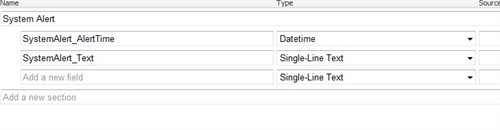
So this is pretty much everything you need to have a system alert system up and running inside sitecore. Remember to edit hardcode root path to system alert root folder.
You can download the project in the download section link here.
And hope you can see the posiblities in this solution or implementaion, you could scheduled downtown and have email alert, downtime calendar and much much more hope you enjoy,


 iStern Blog