Archive
System Alert in sitecore
When working with large Sitecore implementation and customers that have a lot of editors maintaining the content of their website, often makes updating the system becomes a hurdle. Because editors may or may not work in on the same floor or even the same building, so even if you have an contact person who’s responsibility is to notify editor about the downtime, it is possible that one or more editors haven’t heart about the downtime and haven’t save the what they where doing the second the system is taken offline, a valuable work may have been lost.
So I thought what would be more smart the implementing a System alert/ notifier system that alert the users about the forthcoming downtime. This Alert could as in this example be a simple javascript alert.
My solution is build around simple Javascript calling a webservice which looks for alert placed inside sitecore and display them as a simple javascript alert. Yes some may argue that I have some hardcoded path string and what have we not, but it is left to you to move these to fx. The web.config. Even more this solution I maybe a little over the edge when looking at the implementation, but I se so many usages for this so I went ALL-IN as implemented with interface and using a provider model. The solution is build and tested against a Sitecore 6.2, but nothing wrong with using on other Sitecore versions.
But here goes first the javascript since Sitecore editors have three different editors Page Edit, Content Editor and the Desktop. So we need to include the javascript in three different files, and because of the we need to ensure that the file is only loaded once so logged into the Desktop and opening the content editor doesn’t give two warnings, hence the cookie check. Now to javascript, it’s all simple stuff.
The javascript should be include in these three files
Webedit:
sitecore\shell\Applications\WebEdit\WebEditRibbon.aspx
Content Editor:
sitecore\shell\Applications\Content Manager\Default.aspx
Desktop:
sitecore\shell\Applications\Startbar\Startbar.xml
/* Function for calling the webservice                             */
function callWebservice() {
var xmlhttp = new ActiveXObject("Microsoft.XMLHTTP");
xmlhttp.open("GET", "/Components/SystemNotifier/AjaxWebservice/SystemNotifier.asmx/GetAlerts", false);
xmlhttp.setRequestHeader("Content-Type", "application/x-www-form-urlencoded");
xmlhttp.send();

if (xmlhttp.status == 200) {
var str = xmlhttp.responseXml.getElementsByTagName("string").item(0).text;
return str;
}
}

/* function that Get system alerts */
/* update timer by calling the webservice    */
function GetSystemAlerts() {
var alertString = callWebservice();
if (alertString != "") {
alert(alertString);
//increase time to next call so we dont get same alert twice
setTimeout("GetSystemAlerts()", 125000);
}
else {
setTimeout("GetSystemAlerts()", 60000);
}
}

var cookieName = "SitecoreSystemNotifier";

function writeCookie() {
document.cookie = cookieName;
}

function cookieExists()
{

if (document.cookie.length >0 )
{
var offset = document.cookie.indexOf(cookieName);
if (offset != -1)
return true;
return false;
}
return false;
}

function init(){
if(!cookieExists()){
writeCookie();
//SetTimeout in ms
setTimeout("GetSystemAlerts()", 60000);
}
}

init();
Okay now that we have the javascript we need the webservice to be called. It’s fairly simple when using the Provider.
namespace SystemNotifier.AjaxWebservice
{
///
/// Summary description for SystemNotifier
///
[WebService(Namespace = "http://pentia.dk/")]
[WebServiceBinding(ConformsTo = WsiProfiles.BasicProfile1_1)]
[System.ComponentModel.ToolboxItem(false)]
// To allow this Web Service to be called from script, using ASP.NET AJAX, uncomment the following line.
[System.Web.Script.Services.ScriptService]
public class SystemNotifier : WebService
{

[WebMethod]
public string GetAlerts()
{
ISystemAlert alert = AlertProvider.NextAlert;
if (alert != null)
return alert.Text;
return "";
}

private SystemAlertProvider _provider;
private SystemAlertProvider AlertProvider
{
get
{
if (_provider == null)
_provider = new SystemAlertProvider();
return _provider;
}
}

}
}
And now to the provider implementation.
public class SystemAlertProvider
{
private IEnumerable _alerts;
public IEnumerable Alerts
{
get {
if(_alerts == null)
_alerts = GetAlertsFromSitecore();
return _alerts;
}
}

private TimeSpan timespan = new TimeSpan(0, 1, 0);
private IEnumerable GetAlertsFromSitecore()
{
ChildList childList = AlertRootItem.Children;
foreach(Item child in childList)
{
ISystemAlert alertItem = new SystemAlert(child);
if(alertItem.AlertTime > DateTime.Now.Subtract(timespan))
yield return alertItem;
}
}

private const string sitecoreRootPath = "/sitecore/system/SystemAlertNotifier";
private Item _rootItem;
private Item AlertRootItem
{
get
{
if(_rootItem == null)
_rootItem = Database.GetItem(sitecoreRootPath);
return _rootItem;
}
}

private const string _databaseName = "master";
private Database Database
{
get
{
return Database.GetDatabase(_databaseName);
}
}
public ISystemAlert NextAlert
{
get
{
if(Alerts.Count() > 0)
return Alerts.OrderBy(w => w.AlertTime).First();
return null;
}
}
}
And finally the Alert interface and implementation of the same.
Inteface
public interface ISystemAlert
{
DateTime AlertTime { get; }
String Text { get; }
}
Implementaion
public class SystemAlert : ISystemAlert
{
public SystemAlert(Item item)
{
Item = item;
}

private Item Item
{
get;
set;
}

private const string _alertTimeField = "SystemAlert_AlertTime";
public DateTime AlertTime
{
get
{

DateField dateField = Item.Fields[_alertTimeField];
return dateField.DateTime;
}
}

private const string _textField = "SystemAlert_Text";
public string Text
{
get { return Item[_textField]; }
}
}
Now we got all the code working so now we need to have someway to get the info, let’s use a sitecore item. So here is a snapshot of the how my sitecore item looks.
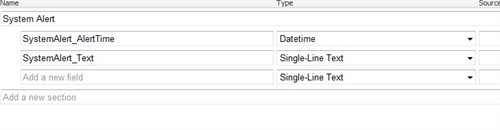
So this is pretty much everything you need to have a system alert system up and running inside sitecore. Remember to edit hardcode root path to system alert root folder.
You can download the project in the download section link here.
And hope you can see the posiblities in this solution or implementaion, you could scheduled downtown and have email alert, downtime calendar and much much more hope you enjoy,
Custom Subitems sorting
Subitems sorting in sitecore only works for some of predefined fields. But it is an easy task to sort items for none standardfields. Subitems sorting is found in Sorting dialog here

First you need to create your own subitem sorting. This can be found in the master database under system/setting/subitems sorting
Easiest thing to do is just to duplicate one of the existing items and edit the duplicated item.
The name of the items will be shown in the sorting list so give i a meaning full name, i choose own created as an example. Bad name !

You need to specifiy in which assambly your compare class is presented in.
This is done in the Data-section.

So for this example we created a our own date field but not all items derives from a template that gives acces to this field, so as a fallback we look at the sitecore __created field “standard field under statistics.
The keypart is the DoCompare function in the following code.
namespace PT.SubItemsSorter
{
public class CreatedComparer : Comparer
{<br>
/// <summary>
/// Initializes a new instance of the <see cref="CreatedComparer"/> class.
/// </summary><br>
/// <remark>Created 13-11-2009 11:55 by ts</remark>
public CreatedComparer(

}

// Methods
protected override int DoCompare(Item item1, Item item2)
{
return GetCreatedDate(item2).CompareTo(GetCreatedDate(item1));
}

/// <summary>
/// Gets the created date.
/// </summary>
/// <param name="item">The item.</param>
/// <returns></returns>
/// <remark>Created 13-11-2009 11:55 by ts</remark>
private DateTime GetCreatedDate(Item item)
{
if (String.IsNullOrEmpty(item[DatasourceCreatedField])
return  GetDate(item,SitecoreCreatedDateField);
return GetDate(item, DatasourceCreatedField);
}

/// <summary>
/// Gets the date.
/// </summary>
/// <param name="item">The item.</param>
/// <param name="field">The field.</param>
/// <returns></returns>
/// <remark>Created 13-11-2009 11:55 by ts</remark>
private DateTime GetDate(Item item,string field)
{
DateField dateField = ((DateField)item.Fields[field]);
return dateField.DateTime;
}

private const string DatasourceCreatedField = "DataSource_CreatedDate";
private const string SitecoreCreatedDateField = "__Created";
}
}
Now you should be able to se it in the subitems sorting list. The code gives you the newest first.

Shortcuts in sitecore revisited
Here is another way to add new shortcuts to the sitecore shell. This method doesn’t use the global keys.xml file but set shortcuts on item level. So if we use the same example as my last entry with shortcuts “we want to bind a shortcut to preview”.
Go into Core database, Find the item “I’ve sorted my items so publish is first”

Now dind the datatab a field KeyCode put in your favortie keycode for thuis example we will bind F10 (keycode 121).
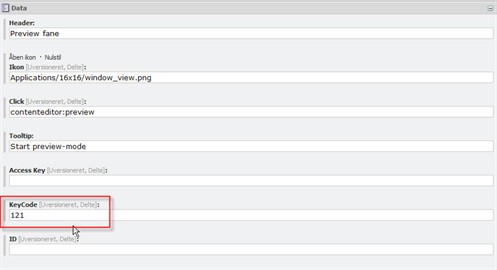
Now you should be able to start the preview by hitting F10.
Create new shortcuts in sitecore
A usefull little thing could be to create your own shortcuts keys in sitecore.
Of course one should be carefull not to override keys allready assigned.
In the file:
sitecore\shell\Controls\Applications\Global Keys.xml
<?xml version="1.0" encoding="utf-8" ?><br>
<control xmlns:def="Definition" xmlns="http://schemas.sitecore.net/Visual-Studio-Intellisense">
<GlobalKeys>
<RegisterKey KeyCode="120" Click="system:publish"/>
<KeyMap/>
</GlobalKeys>
</control>
Simple xml with registered shortcuts for the desktop, you can add your own.
So for example we want to add F10 as a shortcut for preview we add the line.
<RegisterKey KeyCode="121" Click="system:preview"/>
You can finde more keycodes here
Virtualuser in Sitecore 6
As promised a followup to virtualusers in sitecore.
This time for sitecore 6. The changes in the security model made to sitecore 6 makes only minor changes in the creation of the virtualusers. One of these changes are that the domain is set in the username.
using Sitecore.Data;
using Sitecore.Security.Authentication;
using Sitecore.Shell.Applications.ContentEditor.Gutters;

public class User {
private readonly Sitecore.Security.Accounts.User _userItem;

public User(string userName, bool isAdministrator)    {
//make sure that the username i prefixed with "sitecore"
//this sets the domain for the
userName = "sitecore\\"+userName
_userItem = AuthenticationManager.BuildVirtualUser(userName, true);
//Sitecore 6 needs profile settings for useritem
_userItem.Profile.Initialize(userName, true);
_userItem.Profile.Email = userName + "@something.dk";
_userItem.Profile.IsAdministrator = isAdministrator;
//save the useritem
_userItem.Profile.Save();
}

public bool Login()    {
bool loginResult = AuthenticationManager.Login(_userItem.Name);
//Used for setting the show locked item in the gutter
ID gID = new ID("{1A005ECC-65B4-4A00-88BE-A6FA7D64BEA3}");
//Id for showing all locked items
GutterManager.ToggleActiveRendererID(gID);
return loginResult;
}
}
Virtualuser in Sitecore 5.3
If you want to create a user that doesn’t persist in database a virtualuser is the way to go.
It is very simple to setup the user and login him/her into sitecore. The code is ready to integrate into your own little virtualuser class. It is possible to setup most of the ordinary sitecore user item properties, but it is not required, in the following I made possible to set if the user should have Administrator rights or not.
We off course needs to include the sitecorekernel.dll V5.3
using Sitecore.Data;
using Sitecore.Data.Items;
using Sitecore.SecurityModel;
public class MyVirtualUser{
//Setup correct domain for user
private readonly Domain _domain = new Domain("sitecore", "security");
//This is a Sitecore useritem

private UserItem _userItem;

public User(string userName, bool isAdministrator)

//Make new id need for creating the virtual user
ID userId = ID.NewID;<br>

//Build the virtualuser, from the id and the given username
_userItem = _domain.BuildVirtualUser(userId, userName);
//We need to go into "editmode" or edit the flag for the setting
// isAdminsitrator
using (new EditContext(_userItem.InnerItem))
{
_userItem.IsAdministrator = isAdministrator;
}
}
public bool Login(){
//Try to login the user
DomainAccessResult accessResult = _domain.Login(_userItem);
return accessResult.Success;
}
}
A followup to sitecore 6 willl be out soon.


 iStern Blog